OpusClip Review 2026: Long Videos Into Short Clips, Paid by the Minute
OpusClip takes a long video, such as a podcast, webinar, stream or vlog, and cuts it into short vertical clips with captions, reframing and a "Virality Score", then posts them to TikTok, YouTube Shorts, Reels and more. It now also offers ClipAnything prompt-based clipping, an MCP server for AI agents, and a separate AI video generator, Agent Opus. This review checks what it does and costs as of Oct 4, 2026 against OpusClip's pricing page and help center, and sets that against 502 Trustpilot reviews, where praise for saved time sits next to sharp billing complaints.

| Made by | OpusClip (Opus Pro), Palo Alto, California |
| Free plan | 60 credits a month, watermarked, no editing |
| Cheapest paid | $15/mo Starter, 150 credits |
| Best value | Pro, $29/mo or $17.40/mo billed yearly |
| Trustpilot | 4.0 from 502 reviews; 20% one-star |
One of the fastest ways to turn a long video into a week of short clips. Read the billing rules before you subscribe.
"If you publish podcasts, webinars or streams and want clips without an editor, OpusClip earns its price on the Pro plan. Start on Free, judge the clips, and treat the Virality Score as a sorting aid, not a forecast."
Here is how I read it. OpusClip's core job is narrow and valuable: it watches your long video, picks moments that stand alone, reframes them to 9:16, adds animated captions and ranks them. Its newer ClipAnything model also looks at visuals, sounds and emotion, so it can clip sports, vlogs or footage with little talking, and you can steer it with a prompt. Credits are simple to predict, one per minute of the original video you process. The friction is commercial: the free plan watermarks and expires clips after three days, Starter is monthly only, and one in five Trustpilot reviews is one-star, mostly about cancelling and refunds. This is an editorial review based on OpusClip's official pricing page and help center (as of Oct 4, 2026) and public user reviews; it is not a hands-on test.
Upload once; get ranked, captioned, reframed clips ready to post.
OpusClip's own summary describes two products: OpusClip, for clipping and editing long videos, and Agent Opus, an AI agent that generates new videos from a prompt, script, audio or URL. This review focuses on OpusClip, the clipping product most people mean by the name, and covers Agent Opus where it affects pricing. You can import from local files (up to 10 GB on Free and Starter, 30 GB on Pro) or links from YouTube, Google Drive, Zoom and, on Pro, sources such as Twitch, Riverside, Dropbox and Loom.
Map built from OpusClip's help center, pricing page and developer summary, Oct 4, 2026.
The best-known name in AI clipping, backed by SoftBank, with growth claims that keep rising.
Announced by OpusClip on Mar 11, 2025. Press reports put the valuation at $215 million.
OpusClip's own figure; it said "over 10 million" in March 2025. Not independently verified.
400 of them in the last 12 months, Oct 4, 2026.
Annual third-party audit, per OpusClip's help center.
Swipe the table sideways to see every column.
| When | What happened | Source |
|---|---|---|
| Mar 11, 2025 | Funding from SoftBank Vision Fund 2; OpusSearch announced; "over 10 million creators and brands" | OpusClip blog |
| Aug 15, 2025 | Agent Opus introduced on OpusClip's YouTube channel | OpusClip YouTube |
| Jul 29, 2026 | MCP tutorial published; agents can clip and edit through OpusClip | OpusClip YouTube |
| Aug 2026 | Developer summary updated: "16M+ creators and businesses", 29 MCP tools | opus.pro |
| Oct 4, 2026 | Free, Starter, Pro and Business plans; Agent Opus priced separately | opus.pro/pricing |
OpusClip competes with tools that clip as one feature among many, such as Descript and Riverside, and with clipping specialists such as Vizard, Submagic and Klap. Its edge is breadth in one place: clipping, captions, reframing, scheduling and now agent access. Its risk is the same as every AI clipper: the hard part, deciding which moment matters, is exactly where taste beats a score.
Users love the time it saves. The angry reviews are about cancelling, billing and reaching support.
A reviewer on Oct 1 called it a "HUUGE TIME SAVER" that is simpler than Premiere Pro. A podcaster on Sep 21 said they use it regularly for clipping. A four-star review from March called it "phenomenal" for an AI clip editor but mentioned occasional minor bugs and a manual editing interface that could be better.
One user said they signed up on Aug 19, used it about a day, then sent 16 emails asking to cancel while the company tried to charge their card six more times. They described replies mostly from an AI support bot and a request for a signed authorization form. OpusClip replied publicly asking for details to make it right.
A long-time paying customer said on Oct 3 they could not reach support for four days after an invoicing bug. A March reviewer waited several days for an email reply, then praised the staff member who finally helped.
You pay for minutes of source video processed, not for clips produced.
Free
60 credits a month.
- Up to 1080p clips, auto reframe, AI captions
- Watermark; no editing
- Clips exportable for 3 days
Starter
150 credits a month; monthly billing only.
- Virality Score, editor, no watermark
- Auto-post to Shorts, TikTok, Reels
- 9:16 only; 1 brand template
Pro
Or $17.40/mo billed yearly ($208.80); 300 credits a month per pack.
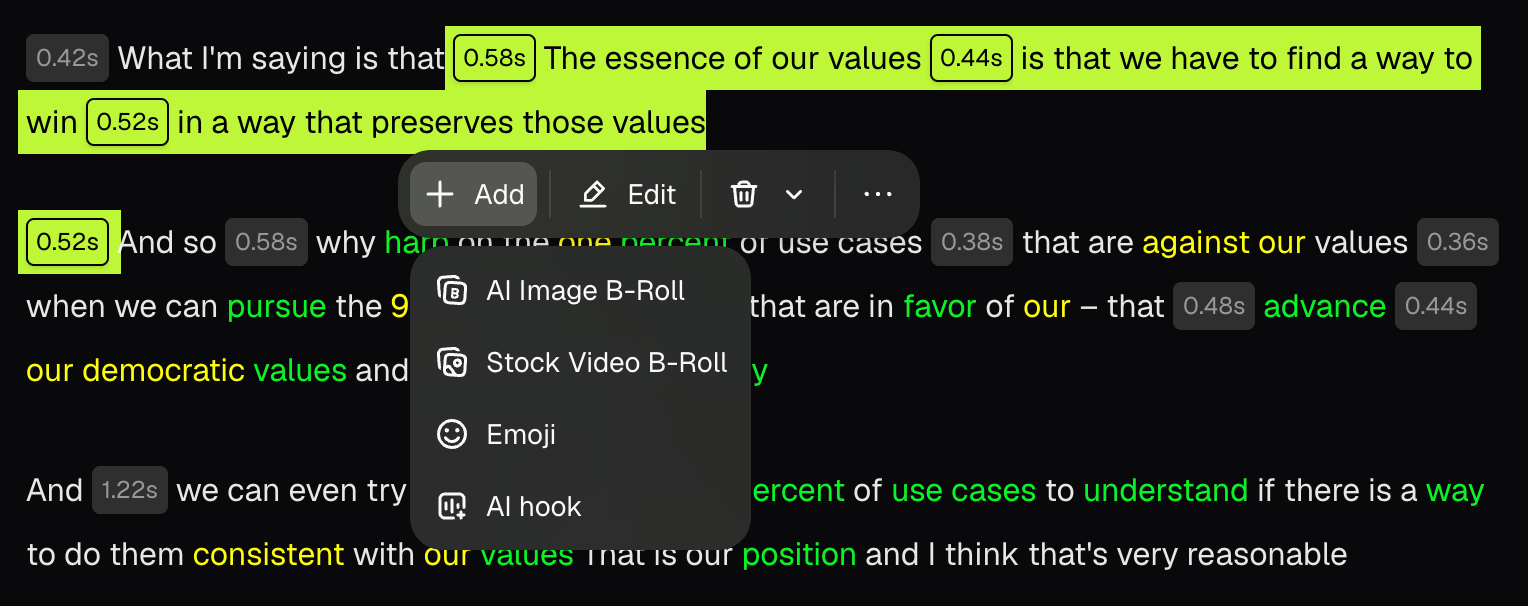
- AI B-roll, scheduler, 9:16, 1:1 and 16:9
- 2 seats per pack (up to 4), 100 GB storage
- Premiere Pro and DaVinci Resolve export, limited API
Business
Credits, seats and storage to order.
- SSO, API and CMS integration
- Priority queue and support Slack
- MSA
Swipe the table sideways to see every column.
| Plan | Price | Credits | Credits expire |
|---|---|---|---|
| Free | $0 | 60 a month | Monthly |
| Starter | $15 a month (monthly only) | 150 a month | 60 days (roll over one month) |
| Pro, monthly | $29 a month per pack | 300 a month per pack | 60 days |
| Pro, yearly | $208.80 a year per pack | 3,600 up front | 12 months |
| Agent Opus Pro | $348 a year | 3,600 a year (about 120 30-second videos) | Per Agent Opus terms |
| Agent Opus Max | $1,548 a year | 18,000 a year; usable on OpusClip | Per Agent Opus terms |
| Business | Custom | Custom | Contract |
Swipe the table sideways to see every column.
| Check you can do | Result (JAVIS arithmetic) |
|---|---|
| Cost per source minute | Starter $0.10; Pro monthly about $0.097; Pro yearly about $0.058 |
| Yearly Pro discount, one pack | $17.40 vs $29 = 40% off |
| A weekly 60-minute podcast | About 240 to 300 minutes a month: Pro covers it, Starter does not |
| Two one-hour streams a week | About 480 to 600 minutes: 2 Pro packs |
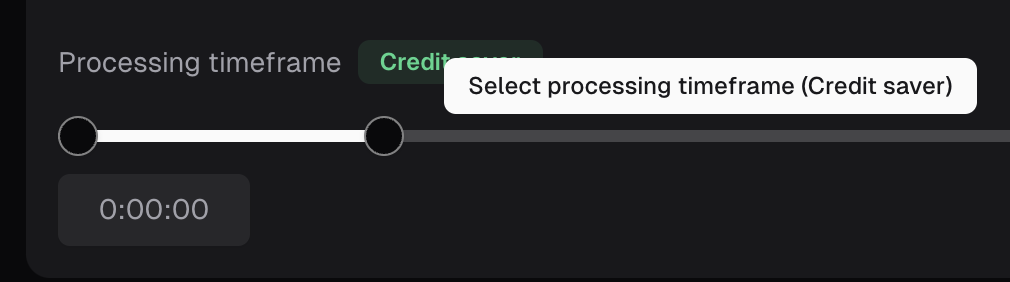
| Process only the best 20 minutes | The processing timeframe slider charges 20 credits, not 60 |
Decide by hours of footage per month and where you post.
Free: 60 minutes a month, watermarked, export within 3 days.
Starter at $15 if under 150 minutes a month and 9:16 is enough.
Pro, yearly if you are sure; monthly if you are still testing.
Pro, for XML export.
Connect the OpusClip MCP server; check API limits on your plan.
Look at Agent Opus, or the generators in Keep Exploring.
ClipAnything finds moments by what it sees and hears, not just what is said.
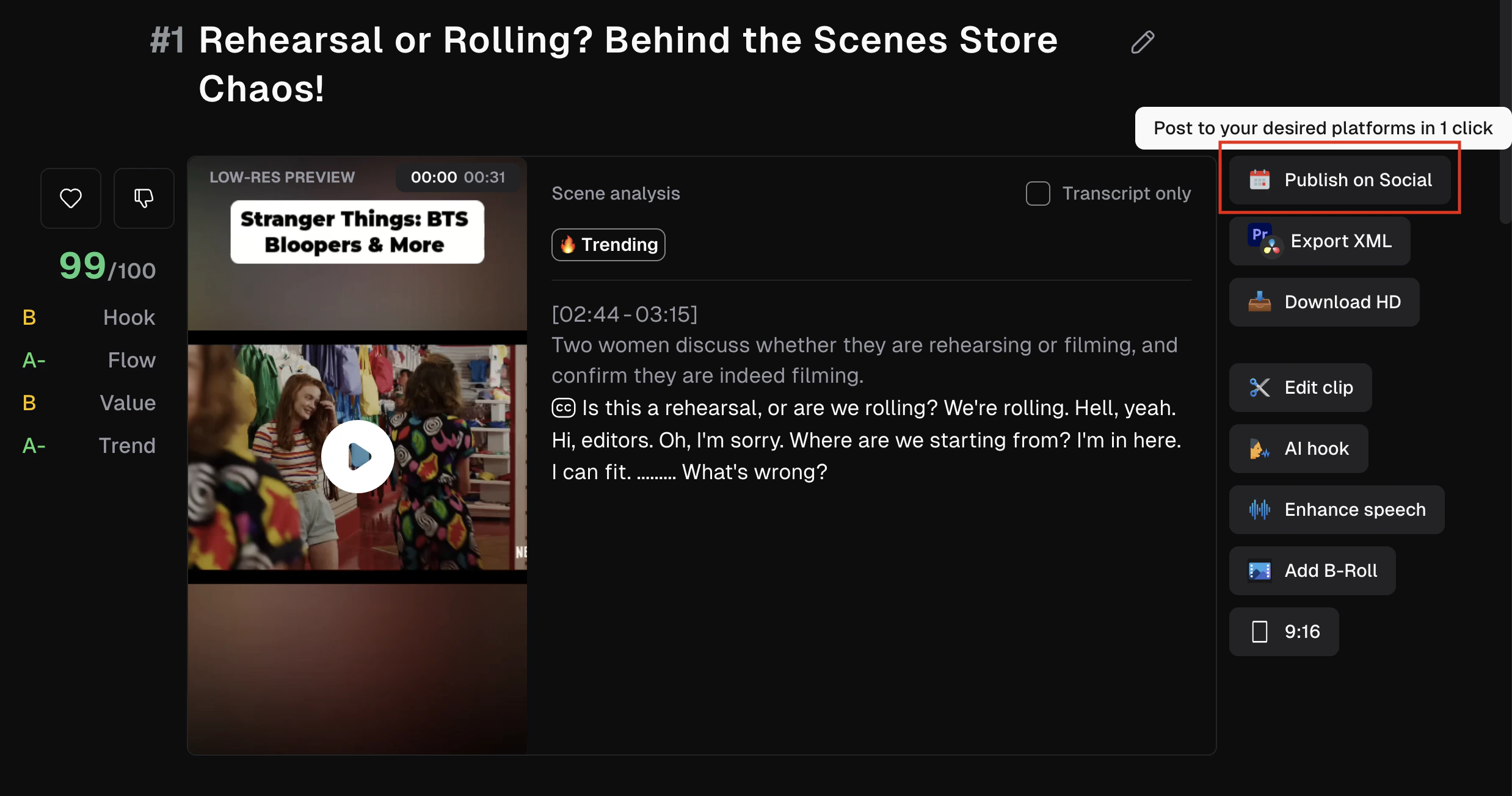
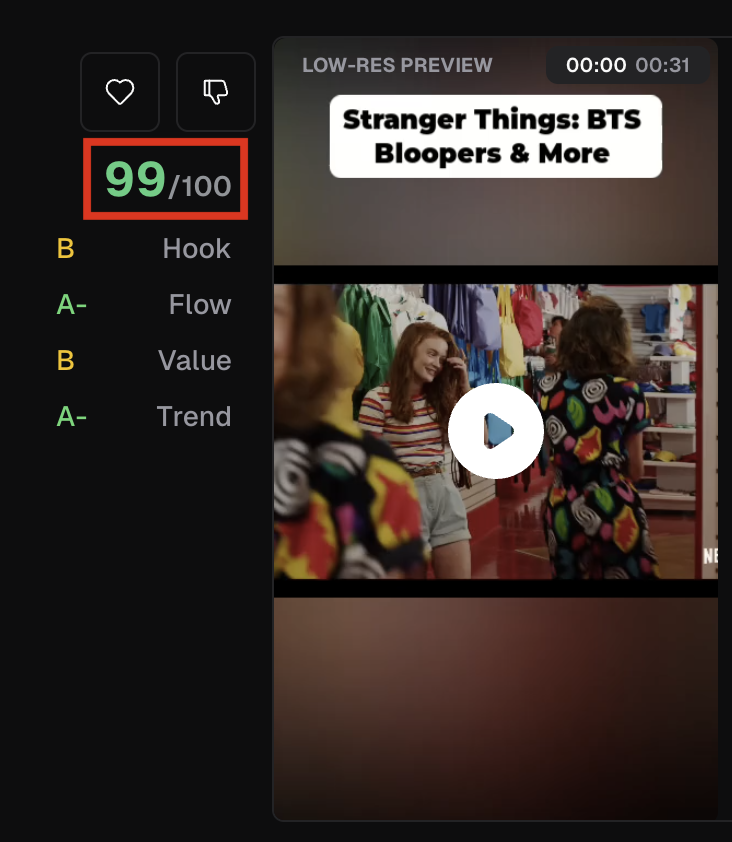
OpusClip has two clipping models. ClipBasic works on talking-head content. ClipAnything, which OpusClip calls multimodal, analyzes frames for objects, actions, text and scenes, audio for speakers, laughter and other sounds, and sentiment, then lets you prompt it ("all the goals", "the funniest moments"). Each clip gets a Virality Score from 0 to 99, built from grades for Hook, Flow, Value and Trend, and clips are sorted by it. The score is for Starter and Pro users; Free users don't see it.
Swipe the table sideways to see every column.
| Capability | ClipBasic | ClipAnything |
|---|---|---|
| Video types | Talking heads only | Vlogs, sports, TV, news, music, little-dialogue footage |
| Prompts | Limited | Natural-language prompts for scenes, actions, people, emotions |
| Visual understanding | No | Objects, colors, actions, on-screen text |
| Audio understanding | Speech | Speakers plus sounds such as laughter |
| Sentiment | No | Yes |
OpusClip's own walkthrough of uploading, clipping, editing and exporting. Published May 18, 2026.
From the official "OpusClip" YouTube channel (youtube.com/@OpusClip). Vendor tutorial, so it shows the best case.
- Clips arrive captioned, reframed and ranked, ready to post.
- ClipAnything handles footage with little dialogue.
- Pro users can refund a project's credits within 14 days if no clip was downloaded.
- The Virality Score is OpusClip's estimate; no public study links it to real views.
- Clip choice still needs a human with taste for your audience.
- Clips can't be refunded once you download one.
Import, choose the timeframe, let it clip, then fix the few that matter.
It can post for you, and AI agents can now run it for you.
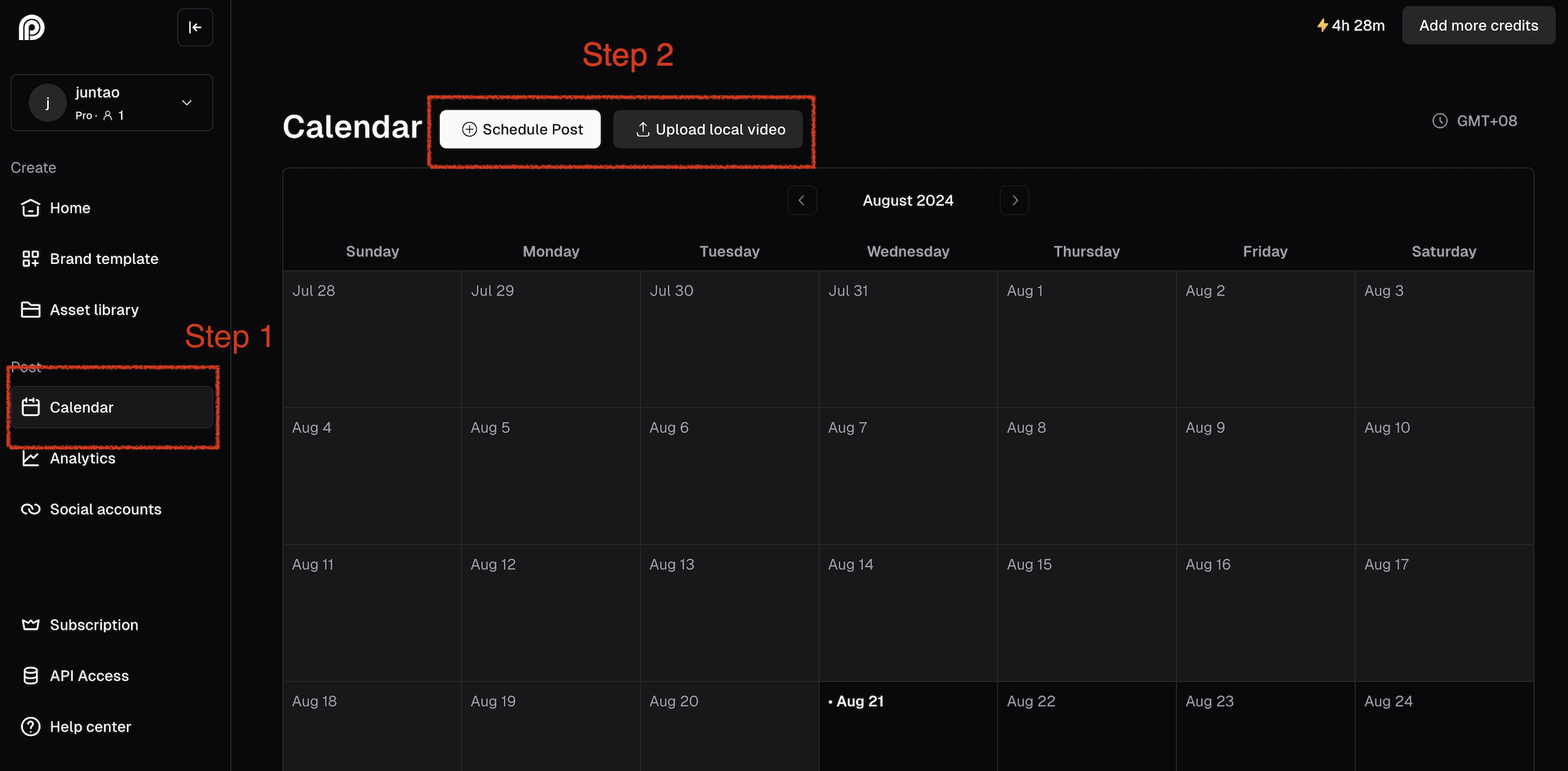
Starter auto-posts to YouTube Shorts, TikTok and Instagram Reels. Pro adds X, Facebook, LinkedIn, Pinterest, Threads and Bluesky, plus a calendar scheduler. For developers, OpusClip runs an MCP server at mcp.opus.pro/mcp that, by its own count, exposes 29 tools for clipping, captioning, reframing, editing, transcribing, thumbnails and posting, and a separate connector for Claude.ai. The REST API allows 30 requests per minute, and on Pro Beta and Max plans it is capped at 900 credits (15 hours) a month per workspace.
OpusClip shows its MCP server clipping video from an AI assistant. Published Jul 29, 2026.
From the official "OpusClip" YouTube channel. Vendor tutorial.
Most of the value beyond clipping sits on the Pro plan.
Swipe the table sideways to see every column.
| Feature | Free | Starter | Pro |
|---|---|---|---|
| Local upload size | 10 GB | 10 GB | 30 GB, plus public MP4 URL |
| Aspect ratios | 9:16 | 9:16 | 9:16, 1:1, 16:9 |
| AI B-roll | No | 3 AI image + 3 stock clips a month | 50 AI image clips a day; unlimited stock |
| AI voice-over | No | 20 a day | 20 a day |
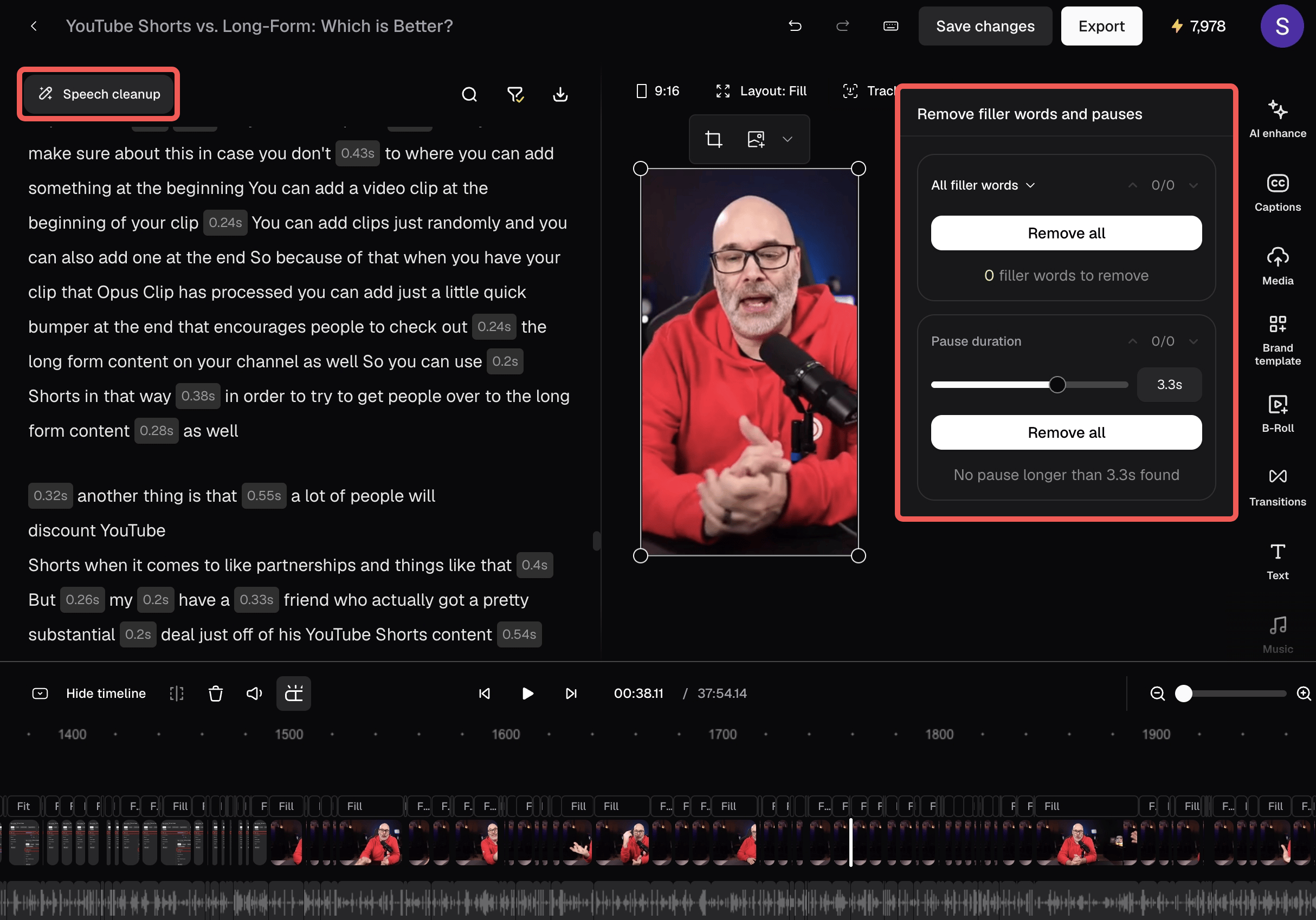
| Speech cleanup | No | Pauses and filler words | Plus enhancement 10 a day |
| Brand templates | 1 | 1 | 2 on the plan card; up to 4 in the comparison table |
| Export window | 3 days, watermark | 30 days | No limit |
| Premiere / DaVinci export | No | No | Yes |
Your bill tracks how much footage you feed it. Trimming the input is the easiest saving.
Swipe the table sideways to see every column.
| Rule | What OpusClip says |
|---|---|
| Charge basis | 1 credit per minute of the original video; under 1 minute rounds up, partial minutes round down |
| X posting | 3 credits per clip per X account; refunded if the post fails or is deleted |
| Monthly credits | Expire after 60 days, so they roll over one month |
| Yearly credits | Granted up front; valid 12 months |
| Cancelling | Remaining credits expire on their original dates; projects are inaccessible 3 days after cancelling |
| Refunds of credits | Pro, within 14 days, before any clip is downloaded |
| Upgrading | Starter to Pro is prorated; adding packs restarts the billing cycle at full price |
SOC 2 Type II and a GDPR page; SSO and dedicated storage are Business-only.
Swipe the table sideways to see every column.
| Control | What OpusClip says |
|---|---|
| Certification | SOC 2 Type II, audited annually by an independent third party; reports in its Trust Center |
| EU and UK data | A help article covers handling of EU and UK customer data |
| Login | Email one-time code on all plans; SSO on Business |
| Team control | Pro: 2 seats per pack, up to 4; Business: sub-teams and member permissions |
| Storage | Free: files expire after 3 days; Starter 29 days; Pro 100 GB; Business dedicated |
| Copyright | A help article sets a copyrighted-content policy; you are responsible for rights to what you upload |
| Social accounts | Connected accounts post on your behalf; Pro allows 6 connections |
Best for people with lots of long-form footage and little editing time.
Swipe the table sideways to see every column.
| Situation | Why OpusClip fits or not | Likely plan |
|---|---|---|
| Weekly podcast or interview show | Talking-head clipping is its strongest case | Pro |
| Streamer or gamer | ClipAnything plus gameplay layout; Twitch import on Pro | Pro |
| Webinar or marketing team | Brand templates, scheduler, seats | Pro or Business |
| Agency with many clients | Needs more seats, API and MSA | Business |
| Occasional creator | Free tests quality; watermark limits real use | Free, then Starter |
| Editor who wants full control | Use XML export into Premiere or DaVinci | Pro |
| Need generated, not clipped, video | That is Agent Opus or a generator | Look elsewhere |
Six real gaps, not manufactured ones.
20% of Trustpilot reviews are one-star, with recent ones describing repeated charges after cancel requests.
Watermark, no editing, and clips only exportable for 3 days.
No square or landscape clips, and no yearly discount below Pro.
"Up to 60%", "50%" and 40% by the listed single-pack prices.
A useful ranking, but OpusClip publishes no study tying it to real-world views.
OpusClip minutes and Agent Opus credits are different units, which makes plans harder to compare.
OpusClip wins on automatic clipping and posting. Others win if editing or generating is the main job.
Swipe the table sideways to see every column.
| If you mostly need... | Compare OpusClip with... |
|---|---|
| Full transcript-based editing of the long video too | Descript review |
| AI avatar or presenter videos | HeyGen review or Synthesia review |
| Generated video footage | Runway review |
| AI voice-over and dubbing | ElevenLabs review |
| Another dedicated AI clipper | Vizard, Submagic or Klap (no JAVIS review yet) |
We may earn a commission. It does not change the facts above.
JAVIS has an approved affiliate relationship with OpusClip. If you subscribe through the "Try OpusClip" or "See OpusClip plans" links on this page, JAVIS may earn a commission at no extra cost to you. The pricing, user complaints, limitations and alternatives in this review were written from OpusClip's own pages and public reviews, and would read the same without that relationship.
Start on the free plan and judge the clips on your own footage.
Open OpusClipRead the alternative that matches your real question.
Choose the next articleOpusClip sits between video editors, video generators and voice tools.




Questions people are actually asking
Is OpusClip free?
Yes, there is a free plan with 60 credits a month. Clips carry a watermark, can't be edited, and are only exportable for three days.
How much does OpusClip cost in October 2026?
Starter is $15 a month for 150 credits. Pro is $29 a month, or $17.40 a month billed yearly, for 300 credits a month per pack. Business is custom.
How do OpusClip credits work?
One credit processes one minute of your original video, so a 30-minute video uses 30 credits. Posting to X costs 3 credits per clip per account.
What is the Virality Score?
A 0 to 99 rating OpusClip gives each clip, based on Hook, Flow, Value and Trend. It is available on Starter and Pro, and is an estimate, not a guarantee of views.
What is ClipAnything?
OpusClip's multimodal clipping model, which analyzes visuals, sounds and sentiment so it can clip any kind of video and follow natural-language prompts.
Can I cancel OpusClip any time?
Yes, from your subscription page. Remaining credits keep their original expiry, and projects become inaccessible three days after cancelling, so export first and keep your confirmation.
Does OpusClip work with Premiere Pro?
Yes, on Pro you can export to Adobe Premiere Pro and DaVinci Resolve.
What are the best OpusClip alternatives?
Descript if you also edit the full video, HeyGen or Synthesia for avatar videos, Runway for generated footage, and dedicated clippers such as Vizard, Submagic or Klap.
Where this came from, and when it was checked.
Pricing and plans: opus.pro/pricing (plans and comparison table), opus.pro/agent/pricing, and the OpusClip help center articles "How Do Credits Work?", "Plans", "Upgrade & Downgrade" and "Refunding a Project", as of Oct 4, 2026.
Product: help center articles on ClipAnything, ClipAnything vs. ClipBasic, Virality Score, supported languages, captions, AI B-roll and scheduling; the API limitations page; opus.pro/mcp; OpusClip's developer summary (updated August 2026).
Security: help center "What are OpusClip's data security standards?" and the pricing comparison (vendor statements).
Market and users: OpusClip blog of Mar 11, 2025 on its SoftBank Vision Fund 2 funding; press coverage of the $215 million valuation; Trustpilot profile for opus.pro (502 reviews, rating split and reviews from Mar to Oct 2026), Oct 4, 2026.
Official videos: youtube.com/watch?v=dvO5NsYovM4 and dPsn-2poyqA, both from the official OpusClip channel.
JAVIS Fit Score (75/100): editorial composite of clipping speed and automation (strong), pricing clarity per minute (good), free-plan usefulness (weak), feature depth on Pro (strong), billing and support sentiment (weak), agent and API access (good), security (good). Weighted by editorial judgement.