Submagic Review 2026: Viral-Style Captions and Fast Shorts Editing, With a Strict No-Refund Policy
Submagic edits short vertical videos for you: animated captions in the "Hormozi" style, auto zooms, B-roll, sound effects, silence and bad-take removal, plus an add-on, Magic Clips, that cuts long videos into shorts. Plans run $19 to $69 a month, or about 40% less billed yearly. Reviewers on Trustpilot praise its human support, but the negative reviews keep returning to one issue: renewals and a no-refund policy. This review checks Submagic's pricing page, help center, API docs and terms as of Oct 4, 2026.

| Made by | Turbo Studio (Submagic), France |
| Best at | Animated captions and polish for short clips |
| Cheapest paid | $19/mo Starter, or $12/mo yearly |
| Long-to-short | Magic Clips add-on, $19/mo |
| Trustpilot | 4.5 from 844 reviews |
The quickest way to give talking-head shorts the captions and pace that perform. Mind the renewal date.
"If you already have short clips and want them captioned, zoomed and cleaned up in minutes, Submagic is excellent value on Pro. If you need long videos cut into clips, budget for the Magic Clips add-on, and set a reminder before your plan renews."
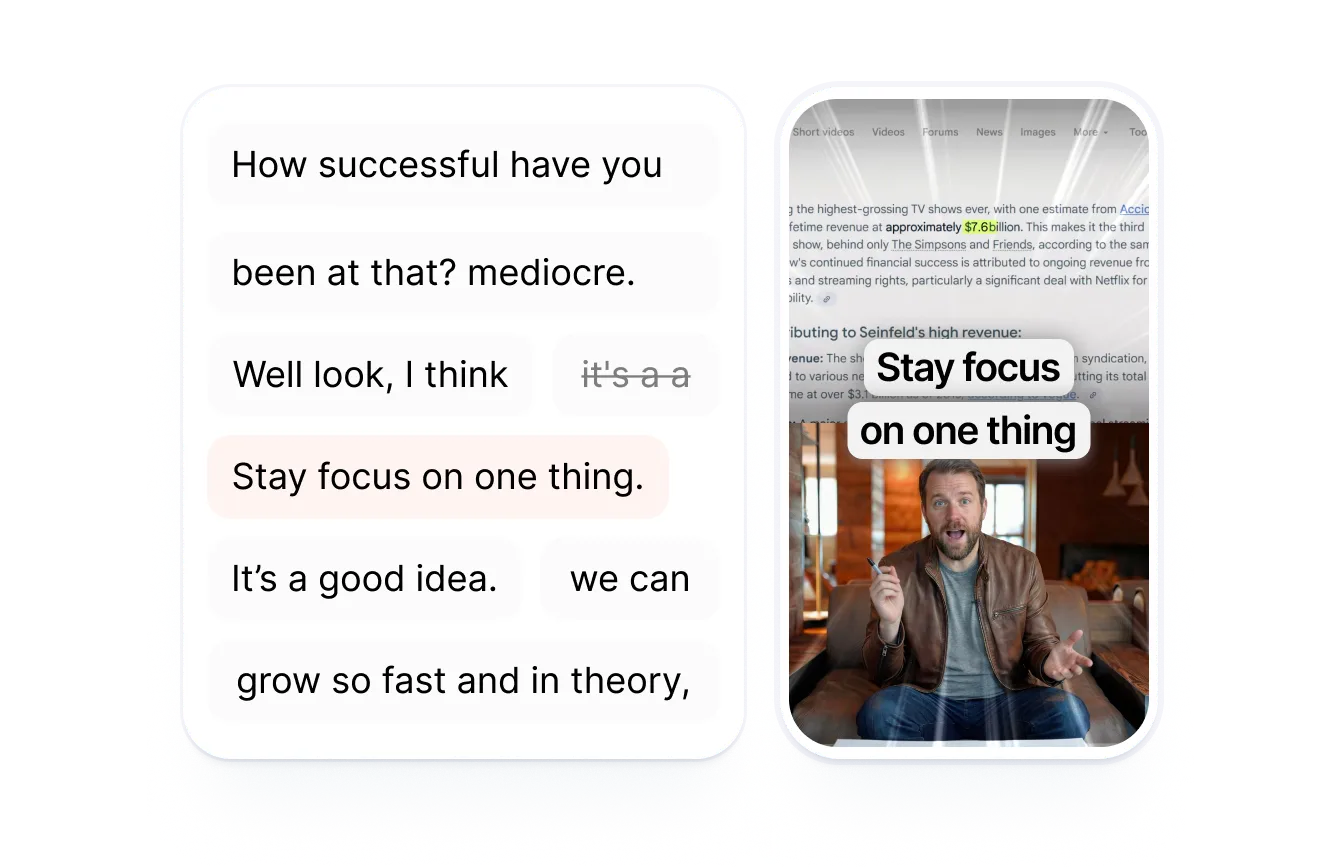
Here is how I read it. Submagic is a finishing tool for short-form video. You upload a clip, pick a caption template, and it transcribes, styles words, adds emojis, zooms, B-roll and sound effects, and can cut silences and bad takes. Magic Clips, a separate add-on, finds 20+ short clips in a long video. The product earns strong reviews for ease and for unusually human support. The risk is commercial: Submagic's help center and terms say fees are non-refundable (with a 14-day withdrawal right for consumers), and several recent one-star reviews describe renewals they did not expect. This is an editorial review based on Submagic's official pricing page, help center, API docs and terms (as of Oct 4, 2026) and public user reviews; it is not a hands-on test.
Upload a short, pick a style, export a polished vertical video.
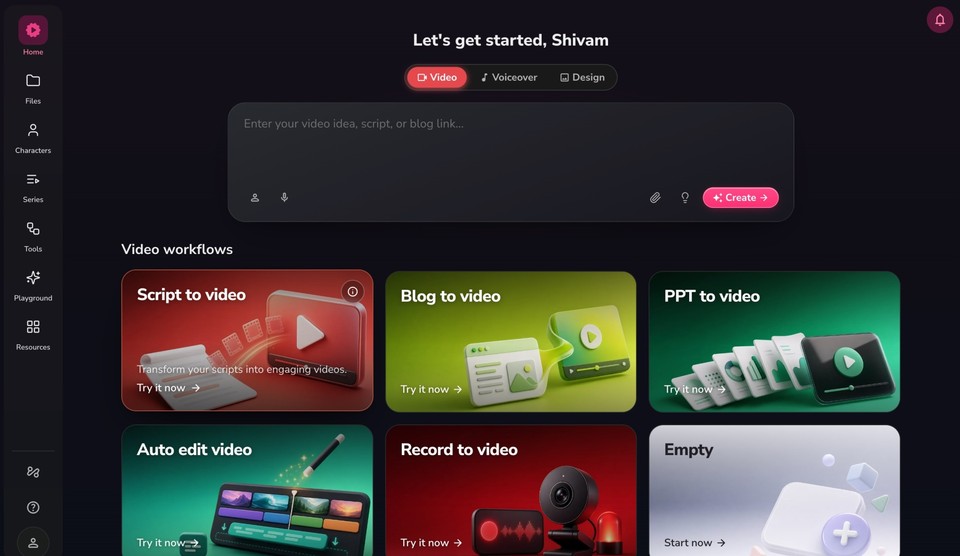
Submagic is run by Turbo Studio, a French company, per its terms. On its dashboard you choose between generating captions for a clip, combining clips, or getting Magic Clips from a long video. Credits on each plan are counted in videos: 15, 40 or 100 a month, with a per-video length limit of 2, 5 or 30 minutes and a 3,000 MB file size cap.
Map built from Submagic's pricing page, help center and API docs, Oct 4, 2026.
A leading caption-style editor for creators, now competing with all-in-one clippers.
Submagic's pricing page, Oct 4, 2026. Vendor figure.
240 in the last 12 months; Trustpilot marks the profile as a paid subscription and notes "No recent history of asking for reviews".
"123 languages" on the homepage; "100+" in the API docs.
Per docs.submagic.co.
Swipe the table sideways to see every column.
| Need | Submagic | All-in-one clippers (e.g. OpusClip) |
|---|---|---|
| Captions and polish for a finished short | Core strength | Included, less style choice |
| Find clips in a long video | Magic Clips add-on | Core strength |
| Pricing unit | Videos per month per member | Minutes of source video |
| Scheduling to social | Pro and up | Usually included on paid plans |
Praise centers on support and ease; complaints center on renewals, refunds and output quality.
An agency video editor praised support that handles issues quickly. A law firm's marketing team said saving a caption style as a template is "a lifesaver", and that a human agent followed up with a walkthrough when a help article on dubbing was out of date. A long-time user valued the Storyblocks B-roll library and 24/7 human support but wants a proper CapCut-style timeline.
One reviewer said €339.48 was charged for a renewal without prior notice and refused under the no-refund policy, and reported it to Stripe and France's consumer authority. Another described withheld refunds and billing without proper notification. A third said an agreed refund was still postponed after more than a month and filed a claim with PayPal; Submagic replied that the charge had been disputed and it could refund only once the dispute cleared.
A June reviewer said exports were compressed with visible quality loss and lag, that some features sat behind extra paywalls not clear in the plan comparison, and that support was slow. A September reviewer called it overpriced and frequently inaccessible.
You pay per member for a monthly allowance of videos, with longer videos on higher tiers.
Free trial
3 short videos, no credit card.
- See the editor and templates
- Per the help center
Starter
$12/mo billed yearly. 15 videos a month, up to 2 minutes each.
- No watermark, AI captions, free B-roll and audio
- 1080p, 30 fps; API 10 min a month
Pro
$23/mo billed yearly. 40 videos, up to 5 minutes.
- Auto zooms, remove bad takes and silences, clean audio
- Storyblocks B-roll, brand kit, publishing
Business
$41/mo billed yearly. 100 videos, up to 30 minutes.
- 4K 60 fps, custom templates, dictionary
- Priority support, API 100 min a month
Swipe the table sideways to see every column.
| Plan | Monthly | Yearly (per month) | Videos a month | Max length | Export |
|---|---|---|---|---|---|
| Starter | $19 | $12 | 15 | 2 min | 1080p 30 fps |
| Pro | $39 | $23 | 40 | 5 min | Up to 2K 30 fps |
| Business | $69 | $41 | 100 | 30 min | Up to 4K 60 fps |
| Magic Clips add-on | $19 | - | 10 uploads | - | - |
| Custom | Contact sales | - | Custom | Custom | SSO, advanced security |
Swipe the table sideways to see every column.
| Check you can do | Result (JAVIS arithmetic) |
|---|---|
| Yearly savings | Starter 37%, Pro 41%, Business 41% (matches "save up to 41%") |
| Cost per video, Pro monthly | $39 / 40 = about $0.98 |
| Cost per video, Pro yearly | $23 / 40 = about $0.58 |
| Starter vs Pro for 20 videos a month | Starter caps at 15, so Pro is the cheapest plan that fits |
| Clipping a weekly podcast | Pro plus Magic Clips: $58 a month |
| Extra API minutes | From $57/mo for 250 min ($0.23/min) to $1,000/mo for 10,000 min ($0.10/min) |
Decide by how many shorts you finish a month, and whether you start from long videos.
Starter, yearly if you're sure.
Pro, the plan most users pick.
Add Magic Clips ($19), or compare with OpusClip.
Business.
Reviewers say Submagic lacks one; keep CapCut or Descript for complex edits.
Stay monthly and note the renewal date; fees are non-refundable.
The reason people buy Submagic: styled, animated captions in a click.
Submagic transcribes the video, then applies a caption template: font, color, animation, emojis and highlighted keywords. Templates are standard on Starter and premium on Pro and Business, and Pro and Business can save custom templates (3 and 5). You fix wording in the transcript rather than on a timeline. Business adds a custom words dictionary for names and jargon.

Submagic's own walkthrough of saving a style once and reusing it. Published May 4, 2026.
From Submagic Academy (youtube.com/@SubmagicAcademy), linked from Submagic's help center. Vendor video.
- Save a caption style once and reuse it on every video.
- Transcript-based fixes are quick.
- No watermark on any paid plan.
- One reviewer reported visible quality loss after export.
- No full multi-track timeline for overlays.
- Check accuracy in your language; Submagic's language counts differ by page.
Upload, style, trim, polish, export or publish.

Long-to-short clipping is an add-on; developers get an API and an MCP server.
Magic Clips takes a YouTube link, an uploaded file or a public Google Drive link, takes 10 to 25 minutes depending on length, and returns 20+ clips with previews and transcripts, per the help center. It is a separate $19 a month add-on with 10 uploads. For developers, the API creates projects, generates Magic Clips, applies templates, exports and publishes; Starter and Pro include 10 API minutes a month and Business 100, per the pricing comparison table, with extra minute packs for sale. An MCP server at api.submagic.co lets Claude, Cursor and other MCP clients drive Submagic.

Submagic's Magic Clips walkthrough. Published May 4, 2026.
From Submagic Academy. Vendor video.
Swipe the table sideways to see every column.
| API credit pack | Price a month | Per minute |
|---|---|---|
| 250 min | $57 | $0.23 |
| 500 min | $75 | $0.15 |
| 1,000 min | $150 | $0.15 |
| 2,000 min | $300 | $0.15 |
| 5,000 min | $500 | $0.10 |
| 10,000 min | $1,000 | $0.10 |
Most of the AI polish starts on Pro.
Swipe the table sideways to see every column.
| Feature | Starter | Pro | Business |
|---|---|---|---|
| Caption templates | Standard | Premium | Premium |
| B-roll | Standard | Premium + movie clips | Premium + movie clips |
| Auto zooms, remove silences and bad takes, clean audio | No | Yes | Yes |
| Custom templates | No | 3 | 5 |
| Publishing profiles per platform | No | 1 | 3 |
| Custom vocabulary | No | No | Yes |
| Priority support and rendering | No | No | Yes |

The price is predictable; the billing terms are strict.
Swipe the table sideways to see every column.
| Rule | What Submagic says |
|---|---|
| Refunds | "We do not offer refunds for our SaaS" (help center); terms: all monthly and annual fees non-refundable |
| Consumers | Terms grant a 14-day right of withdrawal from subscription for individuals, unless the service was fully performed with consent |
| Cancelling | Profile, "Go To Stripe Portal", "Cancel Subscription"; takes effect at the end of the period |
| Pausing | You can pause a subscription for a few months instead |
| Duplicate uploads | If you upload a video twice by mistake, the help center asks you to send the project links to chat support once you reach your credit limit |
You keep the rights to your videos; Submagic gets a license to process them.
Swipe the table sideways to see every column.
| Topic | What Submagic says |
|---|---|
| Company | Turbo Studio, France |
| Your content | You retain all rights; you grant Turbo Studio a worldwide, non-exclusive license to use, modify, reproduce and distribute it on and through the platform |
| Promotional use | Turbo Studio may use your content for promotional purposes unless you opt out by emailing support@submagic.co from your account address |
| Data deletion | A help article covers deleting your account data |
| Enterprise | Custom plan lists advanced security and SSO |
| Social publishing | Connected accounts post on your behalf (Pro and up) |
Best for creators and editors who already have short clips.
Swipe the table sideways to see every column.
| Situation | Why Submagic fits or not | Likely plan |
|---|---|---|
| Creator posting daily talking-head shorts | Captions, zooms and silence removal in minutes | Pro |
| Freelance editor or small agency | Templates, 4K, longer videos | Business |
| Podcaster wanting clips from episodes | Needs Magic Clips add-on | Pro + Magic Clips |
| Developer building a video pipeline | API and MCP server | Business + API packs |
| Complex multi-layer edits | No full timeline | Use a full editor |
Six real gaps, not manufactured ones.
All fees are non-refundable outside a 14-day consumer withdrawal right.
Recent one-star reviews describe renewals without notice.
Long-to-short clipping is a $19 add-on with 10 uploads.
Reviewers miss CapCut-style overlays.
Languages (100+ vs 123) and Business templates (5 vs 10) differ across Submagic's pages.
Starter caps videos at 2 minutes and 15 a month.
Submagic wins on caption style. Others win on clipping long videos or full editing.
Swipe the table sideways to see every column.
| If you mostly need... | Compare Submagic with... |
|---|---|
| Long video to many clips, with scheduling | OpusClip review |
| Full editing of recorded footage | Descript review |
| Videos generated from text | Fliki review |
| Avatar presenters | HeyGen review |
| Free timeline editing | CapCut (no JAVIS review yet) |
We may earn a commission. It does not change the facts above.
JAVIS has an approved affiliate relationship with Submagic. If you subscribe through the "Try Submagic" or "See Submagic plans" links on this page, JAVIS may earn a commission at no extra cost to you. The pricing, refund terms, user complaints and alternatives here come from Submagic's own pages and public reviews, and would read the same without that relationship.
Use the 3 free trial videos on your own clips first.
Open SubmagicRead the alternative that matches your real question.
Choose the next articleSubmagic sits between clippers, editors and AI video generators.





Questions people are actually asking
Is Submagic free?
There is a free trial that lets you upload 3 short videos without a credit card. Ongoing use needs a paid plan.
How much does Submagic cost in October 2026?
Starter $19 a month ($12 yearly), Pro $39 ($23 yearly) and Business $69 ($41 yearly), per member. Magic Clips is a $19 a month add-on.
Does Submagic give refunds?
Its help center says it does not offer refunds, and its terms say all fees are non-refundable, with a 14-day right of withdrawal for consumers.
How do I cancel Submagic?
Go to your profile, click "Go To Stripe Portal", then "Cancel Subscription". Cancellation takes effect at the end of the period; you can also pause.
Can Submagic cut long videos into shorts?
Yes, with the Magic Clips add-on, which returns 20+ clips from a YouTube link, upload or Google Drive link.
How many languages does Submagic support?
Its homepage says 123 languages and its API docs say 100+.
Does Submagic have an API?
Yes, with API minutes on Starter and Pro (10 a month each) and Business (100 a month), extra packs, and an MCP server.
What are the best Submagic alternatives?
OpusClip for clipping long videos, Descript for full editing, CapCut for free timeline editing, and Fliki or HeyGen for generated video.
Where this came from, and when it was checked.
Pricing and plans: submagic.co/pricing (monthly and yearly views, comparison table, API packs) and Submagic help center "How Much Does It Cost To Use Submagic" (updated Sep 30, 2026), "Does Submagic have a Free Trial" and "What Is The Size And Video Length Limit", as of Oct 4, 2026.
Billing: help center "Do you have a refund policy?" (Dec 15, 2023) and "How do I cancel my plan?" (Feb 4, 2026); Submagic terms of use.
Product: Submagic AI video editor, AI caption and AI clip maker pages; help center "How To Use Magic Clips"; docs.submagic.co (introduction, rate limits, MCP server).
Users: Trustpilot profile for submagic.co (844 reviews, rating split, recent and one- and two-star reviews from Jun to Oct 2026), as of Oct 4, 2026.
Official videos: youtube.com/watch?v=NmOyBNubrsw and rZezYDL0WG0, from Submagic Academy, linked from Submagic's help center.
JAVIS Fit Score (76/100): editorial composite of caption quality and speed (strong), price per video (strong), support reputation (strong), billing terms and renewal complaints (weak), long-to-short clipping cost (mixed), editing depth (mixed). Weighted by editorial judgement.