Claude MCP & Connectors: the moment Claude stops being “just a chatbot”
The useful shift is not that Claude suddenly knows more. It is that Claude can work with the places where your actual work already lives — files, inboxes, issue trackers, calendars, APIs and local tools — while keeping permissions visible enough that you can decide how far to let it go.

The value is not “more integrations.” It is less context-shuffling.
When Claude is isolated, your job is partly to become a human connector: find the file, copy the text, paste the context, explain which version is current, then repeat the process for the next system. Connectors remove some of that glue work. Anthropic’s own documentation describes connectors as a way for Claude to access apps and services, retrieve data, and — where permissions allow — take actions in those systems.
The important caveat is that this is not magic access. Claude inherits the user’s permissions in the source system, and Team/Enterprise administrators can narrow tools further. That permission model is one reason connectors feel more like an operating layer than a simple plug-in directory.
There are now three different things people casually call “Claude connectors.”
Keeping them separate makes the rest of the guide much easier to understand.
| Path | Runs where | Best for | Typical reach |
|---|---|---|---|
| Web / remote connector | Anthropic cloud ↔ remote service | Slack, Notion, GitHub, Linear, SaaS | Web, mobile, Cowork, Desktop, Claude Code |
| Desktop extension | Your computer | Local files, localhost DB, desktop apps | Claude Desktop + Claude Code |
| API MCP connector | Your application / Messages API | Developers building their own agent workflows | Application-defined |
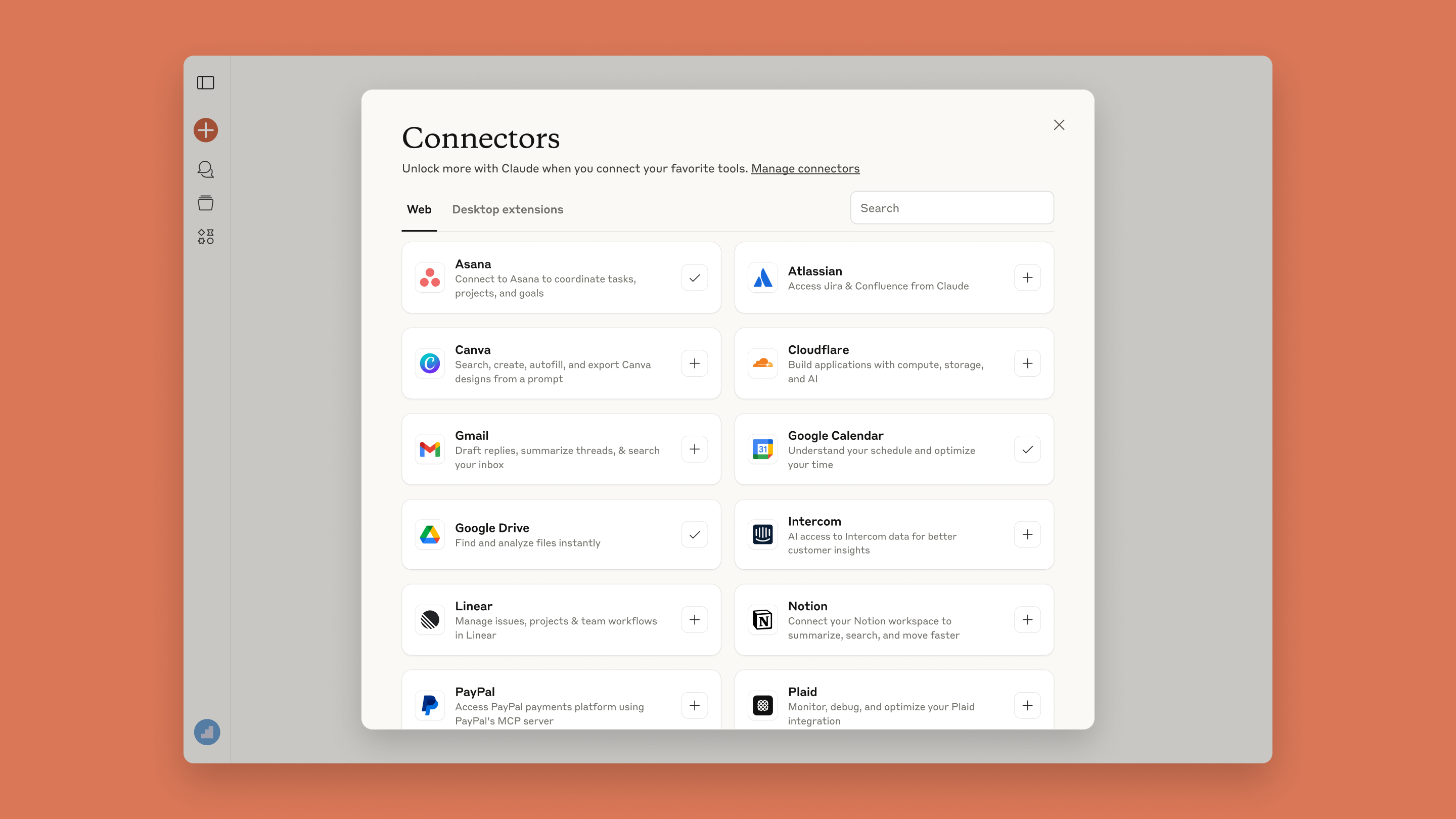
The Connectors directory is a real product surface, not just an MCP configuration file.
Anthropic now exposes a directory flow inside Claude. That matters because mainstream users no longer need to think in terms of server config files for every cloud integration.
The community reaction is less “does MCP work?” and more “which version of MCP should I use?”
Community threads are not representative surveys, so I would not turn them into percentages. But they are useful for locating recurring friction that official documentation naturally does not emphasize.
A February 2026 thread documents a user struggling to connect a remote SSE MCP server in Desktop, then getting it working after changing the bridge/setup.
A long-running MCP user described large tool sets consuming noticeable context and explored moving some tasks to skills instead.
Early mobile remote-MCP users liked connector portability, while some also reported shorter practical conversation headroom during connector-heavy use.
You do not need a premium plan just to understand the model.
Anthropic says custom remote MCP connectors are available on Free, Pro, Max, Team and Enterprise. Free users are limited to one custom connector. Web connectors are available broadly across Claude surfaces; desktop extensions are available through Claude Desktop. Subscription prices change more often than connector architecture, so this guide deliberately does not hard-code plan prices.
| Plan | Web connectors | Custom remote MCP | Key note |
|---|---|---|---|
| Free | Available | Available | 1 custom connector limit |
| Pro | Available | Available | Individual workflow |
| Max | Available | Available | Higher-usage individual plan |
| Team | Available | Available | Org controls can narrow tools |
| Enterprise | Available | Available | Role/tool permissions and governance |
Remote connector, desktop extension, or no connector at all?
MCP is a contract between the AI client and a tool server.
The simplest mental model is not “Claude plugs directly into every app.” It is “Claude talks to a standardized server that exposes a defined set of tools and resources.”
Remote MCP is the “works everywhere” path — with one network consequence people miss.
For a custom remote connector, Claude connects from Anthropic’s cloud infrastructure, not from your laptop. A server that only your browser can reach on localhost, behind a VPN or inside a private network is not automatically reachable by Claude’s remote connector.
If the resource is local, stop trying to force it through a cloud connector.
Desktop extensions package local MCP servers into installable extensions. Anthropic’s current guidance positions them for local files, localhost databases, desktop applications and other resources that need operating-system-level or local-network access.
| Question | Remote connector | Desktop extension |
|---|---|---|
| Cloud SaaS? | Best fit | Usually unnecessary |
| Works on mobile? | Yes | No |
| Local filesystem / localhost? | Not the natural fit | Best fit |
| Requires public internet endpoint? | Custom remote MCP: yes | No |
| Org can manage access? | Yes | Admin controls available |
The easiest setup path is boring — and that is a good thing.
If a directory connector exists, start there. Only build or attach a custom MCP server when the directory does not cover your use case.
Google Workspace is where the “less copy-paste” benefit becomes obvious.
Anthropic’s Google Workspace connector documentation says Claude can work with Gmail, Google Calendar and Google Drive, including search/read workflows and — with approval and permissions — actions such as sending or managing items.
For software work, connectors can turn scattered project state into one conversation.
The strongest use cases cross tools, not just individual apps.
Anthropic’s own connector training uses a release-note style example: pull completed work, find the organization’s communication template, then produce output grounded in both. That is the pattern worth copying — not “connect Slack because Slack exists.”
Some connectors are no longer text pipes — they can render interfaces inside the conversation.
Anthropic describes interactive connectors as connector experiences that can show inline or full-screen apps in Claude, allowing the user to filter, edit or confirm actions without leaving the conversation.
Ten connectors can be less useful than three if they crowd the conversation.
Anthropic explicitly warns that connectors consume conversation space. Its tool-access documentation recommends controlling how connectors load, especially when you have ten or more active.
| Mode | What happens | When I would use it |
|---|---|---|
| Auto | Claude dynamically chooses connector loading. | Most normal setups. |
| On demand | Connector descriptions/tools are not all loaded up front. | Large connector libraries or context-sensitive work. |
| Manual selection | You narrow which tools are relevant to the conversation. | High-control or sensitive tasks. |
Usually easy to reason about.
Anthropic specifically suggests considering On demand.
Tool descriptions compete with task context.
Give Claude the tools the current workflow needs.
The connector is not the permission boundary by itself.
There are multiple layers: what the source service permits the user to do, what the connector exposes, what Claude’s organization/tool policy allows, and what the user approves in the moment. Anthropic’s Team/Enterprise controls can narrow a connector from write-capable to read-only or block individual tools.
| Question | Lower risk | Higher risk |
|---|---|---|
| Who operates the MCP server? | Trusted vendor / your org | Unknown third party |
| Tool capability? | Read/search | Send/delete/pay/change |
| Scope? | Minimum required data | Broad account access |
| Approval? | Needs approval | Always allow on consequential tools |
| Auditability? | Logs + revocation path | No clear history or owner |
Connectors remove copy-paste, but they add a new kind of operational clutter.
| Limitation | Why it happens | Practical response |
|---|---|---|
| Context/tool overhead | Large tool schemas consume room and increase selection complexity. | Use Auto/On demand and keep the active set small. |
| Remote/local confusion | Remote custom connectors originate from Anthropic cloud. | Use desktop extensions for local/private resources. |
| Permission interruptions | Write-capable tools may require approval by design. | Pre-authorize only low-risk tools; keep consequential actions gated. |
| Connector quality varies | MCP servers are separate products with their own reliability. | Prefer trusted vendors, narrow permissions, test with low-risk tasks. |
| Not every workflow needs MCP | One-off context can be cheaper to upload or paste. | Connect only recurring workflows. |
Sometimes the best alternative to an MCP connector is… not another connector.
| Need | Best starting point | Why |
|---|---|---|
| One file, one task | Upload the file | No persistent integration overhead. |
| Recurring cloud workflow | Remote connector | Portable across Claude surfaces. |
| Local/private machine resource | Desktop extension | Local access without public endpoint. |
| Repeatable instructions, no live data | Skill | Encodes method rather than external access. |
| Developer-controlled agent app | API MCP connector | Programmatic allow/deny/tool configuration. |
| Browser-only task | Browser capability / direct web workflow | May be simpler than maintaining an MCP server. |
The sweet spot is “high context, repeated workflow, multiple systems.”
Useful when project state, documents, messages and calendars live in separate systems.
High fit
Useful for code + issue + incident + custom API workflows, especially when tool boundaries are explicit.
High fit
Useful when you repeatedly use the same Drive/Gmail/task data. Overkill for occasional one-file questions.
Conditional fit
Watch Anthropic’s own connector walkthrough before building anything custom.
The official tutorial is short and useful because it demonstrates the intended product experience: browse connectors, enable the tools you need, then let Claude use real work context instead of manually pasted copies.
Connectors are worth it when they replace a repeated human handoff.
If you keep copying the same project state, email thread, source document or issue list into Claude every week, a connector is probably worth testing. If the job happens once a month and needs one file, the connector may create more operational surface area than it saves.
| Your situation | My call | Reason |
|---|---|---|
| Repeated cross-tool workflow | Connect | Highest leverage. |
| Single SaaS used every day | Connect | Reduces copy-paste and context hunting. |
| Local/private tool | Use Desktop path | Do not force it into remote MCP. |
| Unknown third-party MCP with write access | Wait | Trust and permissions are not clear enough. |
| One-off document task | Skip connector | Upload/paste is usually simpler. |
Choose the next article by what you need to do next.
Questions that usually come up after the first connector
Is MCP the same thing as a Claude connector?
No. MCP is the open protocol. A Claude connector is a product integration experience that can use MCP underneath it.
Can a remote connector access localhost?
Not directly through the normal custom remote connector path. Anthropic says those connections originate from its cloud. Use the local/Desktop route for local resources.
Are custom connectors available on Free?
Yes. Anthropic currently says Free users can use one custom connector.
Should I enable write permissions?
Only when the workflow actually needs them and you trust the server, scope and approval model. Read-only is a safer default for discovery and analysis workflows.
Do more connectors make Claude better?
Not automatically. Anthropic’s tool-access guidance explicitly addresses connector overhead and recommends On demand when connector libraries become large.
How this review was built
This is a verified editorial review, not a claim of private hands-on testing inside every connector. Product claims were checked against Anthropic Help Center, Claude Platform documentation and Anthropic announcements on 19 September 2026. Community sources are used only to identify qualitative patterns and are explicitly labeled anecdotal.
Anthropic Help Center, Claude Platform Docs, Anthropic product announcements and Claude Academy.
Selected Reddit discussions used as friction signals. No community thread is treated as representative market research.
Core sources: Connectors · Remote MCP · Remote vs Desktop · Tool access · MCP announcement.