
Notta Review 2026: Cheap, Multilingual Meeting Notes From $8.17 a Month, With a Free Plan That Stops at 3 Minutes
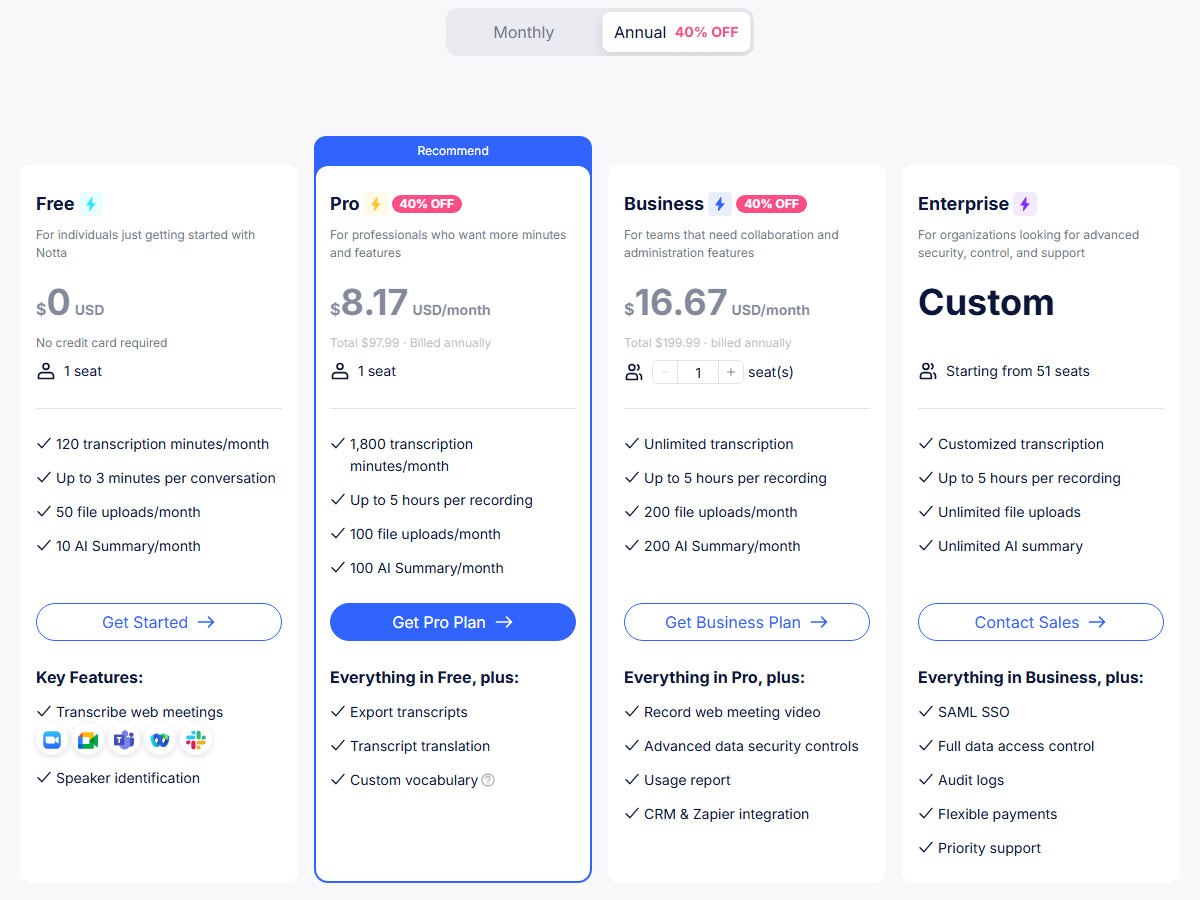
Notta is an AI meeting notetaker: it records online meetings through a bot or straight from your computer, transcribes in 58 languages, writes AI summaries, and since 2026 adds a separate AI workspace called Notta Brain plus an MCP connection for AI assistants. As of Oct 27, 2026, its pricing page lists four plans: Free, Pro at $8.17 a month billed yearly ($97.99 a year), Business at $16.67 per seat a month billed yearly ($199.99), and a custom Enterprise plan from 51 seats. Notta’s help center, as read on Oct 27, 2026, puts the monthly prices at $13.49 for Pro and $27.99 per seat for Business, and the Monthly button on the pricing page, checked in a normal browser on the same day, shows the same figures. The catch is in the free plan: 120 minutes a month, but each recording is transcribed only “Up to 3 minutes per conversation”.
Every Notta link in this review goes straight to notta.ai, its help center or its legal pages.
| Made by | Notta PTE. LTD. (Singapore) for users outside Japan; Notta 株式会社 for users in Japan, per its Terms |
| What it is | AI meeting recorder, transcription in 58 languages, AI summaries, Notta Brain, MCP and CLI |
| Plans | Free; Pro $8.17 a month yearly or $13.49 monthly; Business $16.67 per seat yearly or $27.99 monthly; Enterprise custom |
| Free plan | 120 minutes a month, 3 minutes per recording |
| Best for | Solo users and small teams on Pro or Business who need many languages or bilingual meetings at a low price |
Notta is one of the cheapest paid meeting notetakers we have priced, and its free plan is a demo, not a plan.
$97.99 a year buys 30 hours of transcription a month in 58 languages. The free plan transcribes the first 3 minutes of each recording.
Notta’s strength is plain value. Pro costs $8.17 a month billed yearly, a few cents below Otter’s Pro on the same day ($8.33) and below Fireflies’ Pro ($10), and it includes 1,800 transcription minutes a month, recordings up to 5 hours, 100 AI summaries, translation of finished transcripts and exports. Its language features go beyond plain transcription: 58 languages, bilingual transcription of two languages in one meeting, and real-time translation, which suits teams that hold meetings in Japanese, Spanish or Chinese alongside English. In 2026 Notta also added a bot-free desktop recorder for Mac and Windows, an on-device Privacy Mode for paid plans, and an MCP server and command-line tool so an AI assistant can pull your transcripts.
The weak points are the edges. The free plan’s 120 minutes sound generous until you see the per-recording cap: a 30-minute call is transcribed only to minute 3, and the home page’s “120 free minutes with full transcription” does not mention it. Refunds for web purchases are “generally not provided”, per the help center as read on Oct 27, 2026. The web trial asks for a card and charges the full $97.99 yearly Pro fee the moment the 3 days end. Notta Brain, the new AI workspace for slides, images and cross-meeting questions, is billed separately: a paid Notta plan alone keeps you at 1,000 Brain credits a month, about 10 questions. And accuracy claims vary from “98%+ Accuracy Guaranteed” on the home page to 50% to 80% for casual meetings in Notta’s own help center.
Three ways in (bot, desktop, upload), one transcript in the middle, AI on top.
Every Notta recording lands in a workspace as a transcript with speakers and timestamps. It can come from a Notta bot that joins Zoom, Google Meet, Microsoft Teams or Webex as a visible participant, from Notta Desktop recording your computer’s audio with no bot, from the mobile app or Chrome extension, from an uploaded file or YouTube link, or from Notta’s own Memo voice recorder. From the transcript you get AI Notes (summaries with action items), translation, exports and sharing. Above that sits Notta Brain, a separate AI workspace with its own credit meter, and the MCP server and CLI for AI assistants.
Swipe sideways to see the whole diagram.
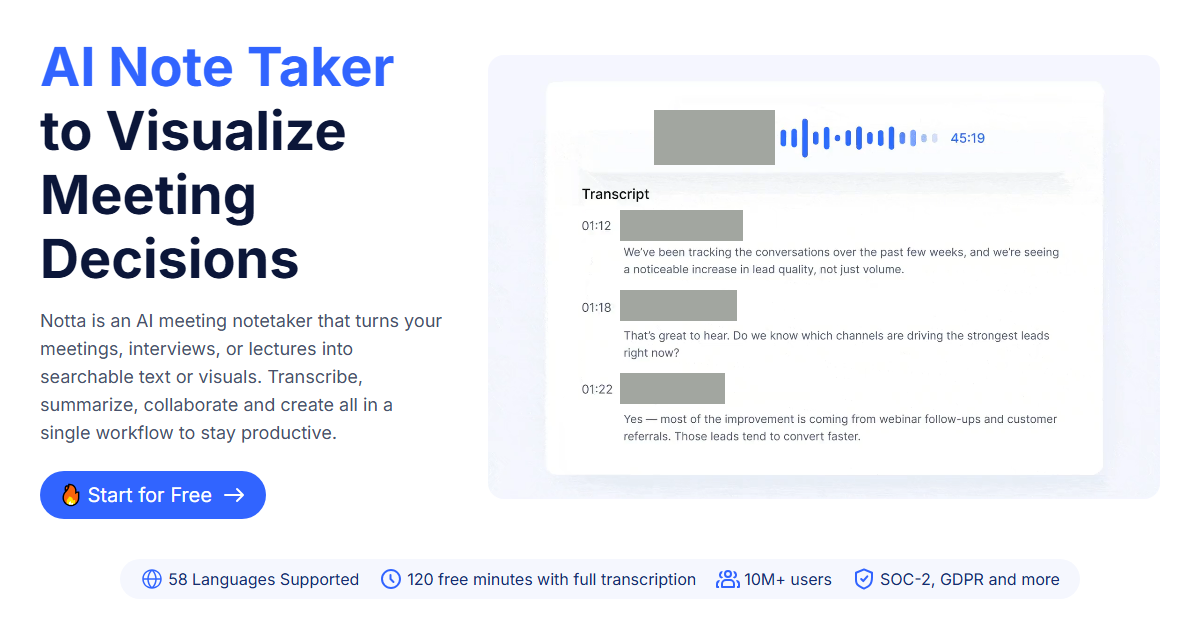
Notta’s home page shows the product the way most people will meet it: a transcript with timestamps and speakers, and a promise of 120 free minutes. Notta’s own sample names and photos in the demo are covered here with grey boxes.
Pro got cheaper and longer recordings. The 3-minute free cap never moved.
Internet Archive copies of notta.ai/en/pricing show how the plans moved. On Apr 29, 2024, Pro cost $9 a month billed yearly, with a “Max 90-minute duration per conversation” and 15 uploaded files a month; Business was already $16.67 per seat ($199.99 a year). The help center dates that layout: a “new pricing structure” arrived on Apr 17, 2024, and subscriptions created before then cannot switch billing cycle.
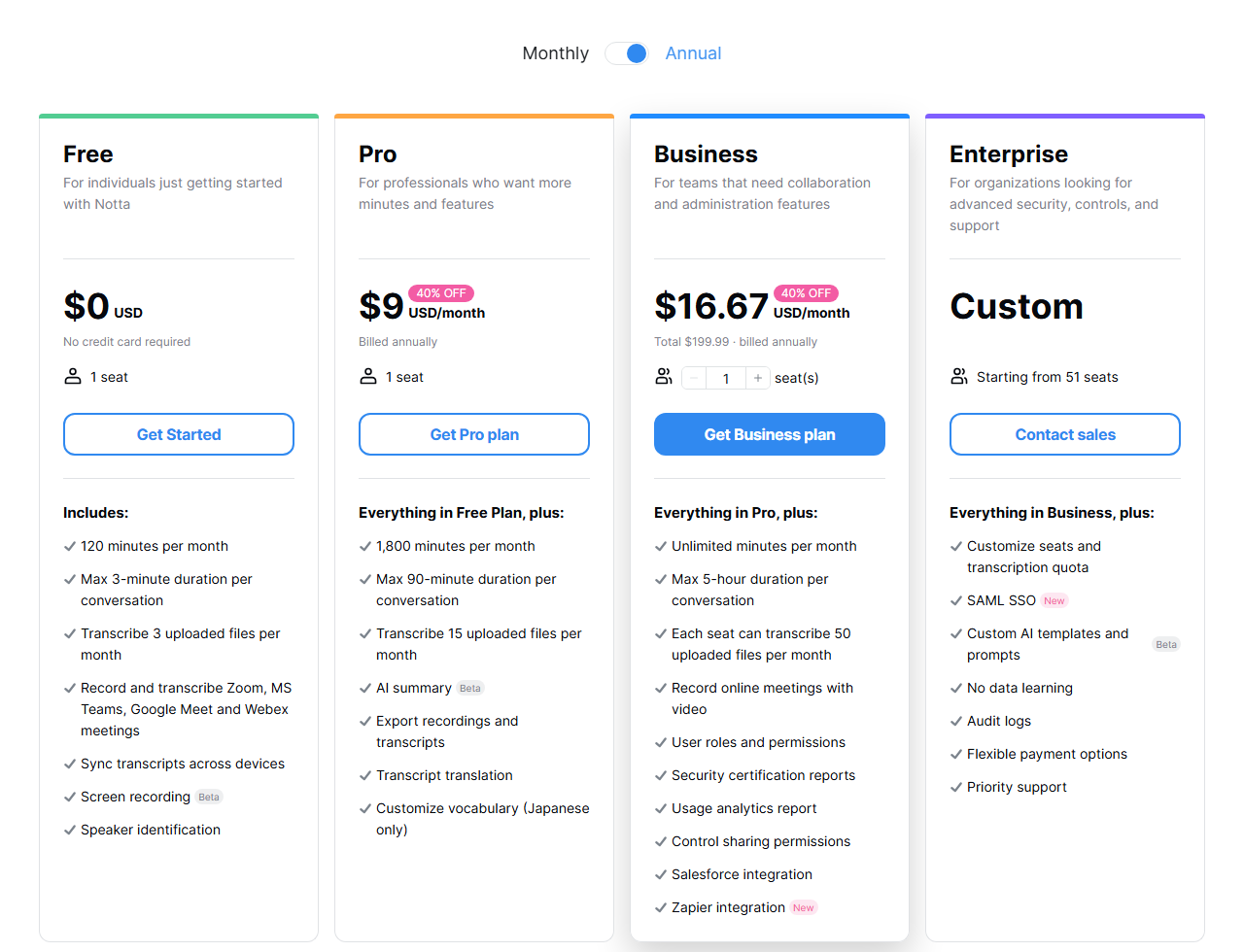
In January 2025 the cards looked like today’s, but Pro was still $9 with “Up to 90 minutes per conversation” and 30 AI summaries a month, Business had 50 summaries, and the Enterprise card listed “No data used for AI training”. By Apr 1, 2025 Pro had dropped to $8.17; by Jun 16, 2025 its cap had risen to 5 hours; by Sep 18, 2025 summaries had risen to 100 on Pro and 200 on Business. The Free card has said 3 minutes per conversation in every copy we checked.

| Date | Change | Source |
|---|---|---|
| Mar 19, 2024 | Pro $8.25 a month billed yearly; Free 120 minutes with a 3- or 5-minute cap per transcription | Internet Archive copy |
| Apr 17, 2024 | New pricing structure; older subscriptions cannot change billing cycle | Help center, billing cycle |
| Apr 29, 2024 | Pro $9 yearly with a 90-minute cap; Business $16.67 ($199.99) | Internet Archive copy |
| Apr 1, 2025 | Pro $8.17 a month billed yearly | Internet Archive copy |
| Jun 16, 2025 | Pro recordings up to 5 hours | Internet Archive copy |
| Sep 18, 2025 | AI summaries 100 on Pro, 200 on Business; total $97.99 shown | Internet Archive copy |
| Mar 4, 2026 | “AI Chat is now Notta Brain” video published | Official YouTube channel |
| Mar 10, 2026 | Login outage, 10:32 AM to 2:52 PM JST | Help center incident report |
| Apr 10 to 13, 2026 | Notta CLI and Notta MCP first published | npm registry |
| Jun 30, 2026 | Notta Brain add-on appears in pricing; absent from the Feb 9 copy | Internet Archive copies |
| Sep 2, 2026 | Current Terms of Service take effect | Terms page |
A large consumer user base by Notta’s own count, and three different accuracy figures.
Notta is run by Notta PTE. LTD. in Singapore, with Notta 株式会社 serving users registered in Japan, per its Terms. It competes with Otter, Fireflies, Fathom and tl;dv for meeting notes, and with transcription apps on phones. The size figures below are Notta’s own and measure different things.
| Signal | Value (as stated) | What it measures, and what it does not |
|---|---|---|
| Users | 10M+ users (home page); “Over 10 million+ people trust Notta to convert audio to text.” (about page) | Accounts or people who used Notta, by Notta’s count; not paying customers |
| Companies | 6000+ companies (about page) | Organizations using Notta; not seats or revenue |
| Volume | 30 million+ hours of transcribed content (about page) | Cumulative usage; not monthly activity |
| Store installs | Google Play: 1M+ downloads; Chrome Web Store: 100,000 users | Installs of the Android app and the extension; set by the stores |
| Store ratings | App Store US 4.1 (1,466 ratings); Google Play US 4.1 (21.5K reviews); Chrome Web Store 2.8 (44 ratings) | Ratings of the mobile apps and extension, not of meeting accuracy |
Sources: notta.ai home and about pages; apps.apple.com/us, play.google.com (gl=US) and chromewebstore.google.com listings, Oct 27, 2026.
What Notta says about accuracy
This is the number buyers care about most, and Notta gives three answers. The home page promises “98%+ Accuracy Guaranteed”. The bot-free page links to its transcription page with the line “98.86% accuracy”. Notta’s own help center article on accuracy (updated Dec 15, 2025) is more careful: formal meetings where people speak in an organized way reach “90% or higher recognition rate.”, casual discussions a “Recognition rate around 50% to 80%”. No public Notta page explains what “Guaranteed” means: there is no test set and no stated remedy.

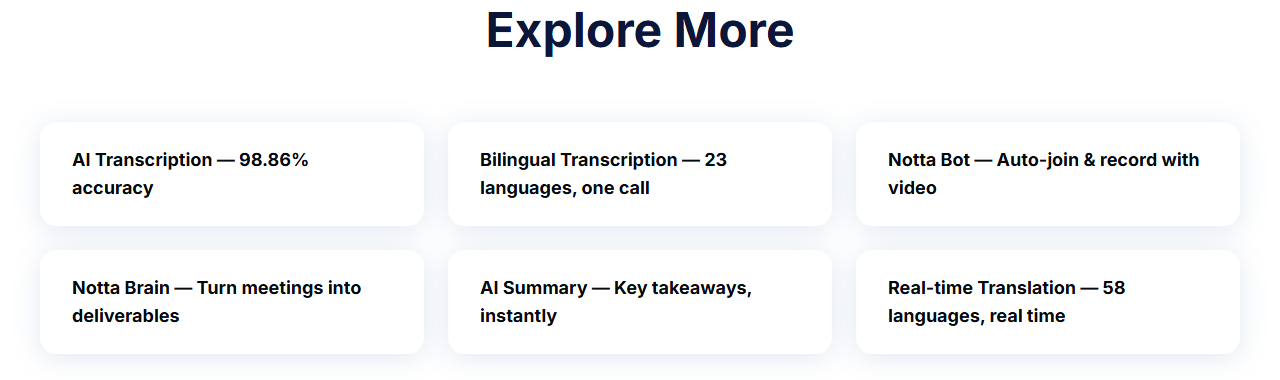
How to read this: the help center’s 50% to 80% range for casual meetings is the planning number. If your meetings are informal, cross-talk heavy or recorded far from the microphone, budget time to edit transcripts, and test with your own audio during the trial.
Thousands of store ratings average 4.1. The complaints repeat: stopped recordings, quotas and support.
Notta has more independent rating data than most tools in this category, because its phone apps are widely installed. The three listings rate different products: the iPhone app, the Android app and the Chrome extension. Figures are from the US storefronts on Oct 27, 2026.
| Store (US) | Listing | Rating | Notes |
|---|---|---|---|
| Apple App Store | Notta Transcribe Voice to Text | 4.1 from 1,466 ratings | Seller shown as Mind Cruiser Limited |
| Google Play | Notta-Transcribe Audio to Text | 4.1, 21.5K reviews | 1M+ downloads; NOTTA PTE. LTD.; updated Oct 22, 2026 |
| Chrome Web Store | Notta: AI Meeting Notetaker & Audio Transcription | 2.8 from 44 ratings | 100,000 users; developer shown as Airgram Inc.; updated Oct 14, 2026 |
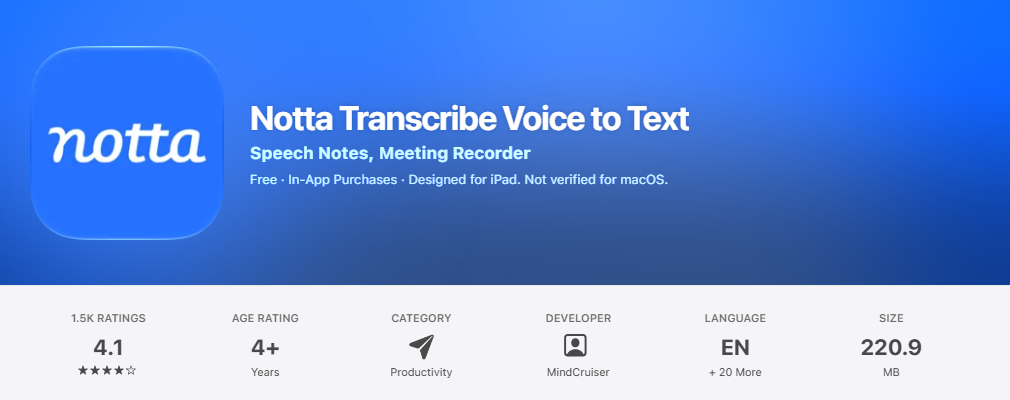

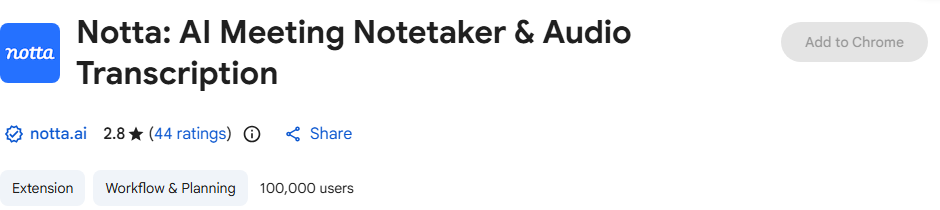
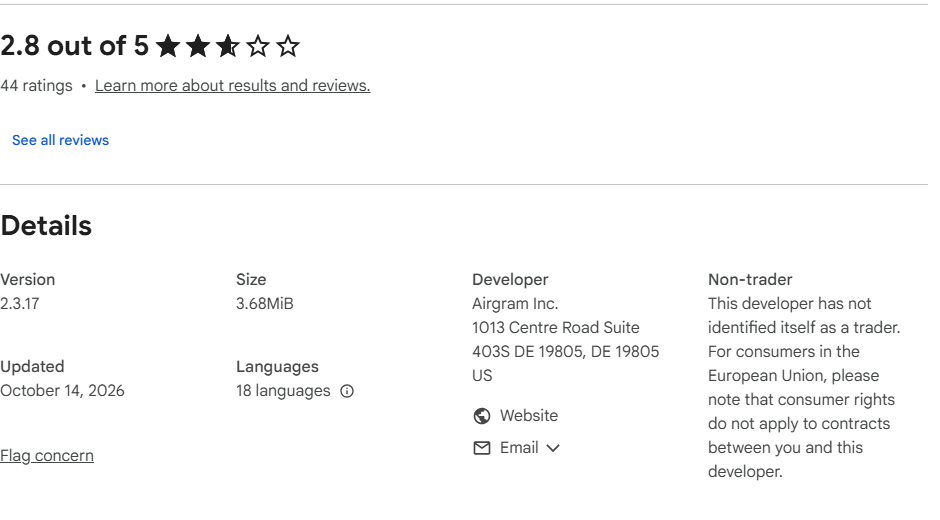
The reviews shown on those listings are a handful chosen by the stores, not a sample, but they line up with each other. Here are four with their dates.
“I can actually stay present & focus on the conversation.”
An interviewer who records, transcribes and uses AI Notes with a custom template.
“For more than 50% of the meetings, the recording stopped after the first few minutes and I lose the rest of the recording.”
Fine for solo voice notes, unreliable for multi-speaker meetings; Notta replied on Apr 17, 2026.
“Can accurately transcribe bilingual text, such as lessons.”
A language learner; one star off because it does not capture audio from other Android apps.
The free-plan cap shows up in the angriest reviews. A one-star App Store review from Dec 27, 2025 says the 120 free minutes are a total and “each recording can only be 2 minutes which is nothing” (the pricing page says 3 minutes today). A Google Play review from Jan 25, 2022 reported the same “interruption” message, so the problem is not new, and App Store reviews from 2023 and 2025 describe slow email support.
Hacker News, where developers discuss tools, has little on Notta. A 2024 post by the maker of a competing subtitle tool said that with Happyscribe and Notta “the transcription quality for Asian languages was just terrible” (item 40716905, Jun 18, 2024), and a 2025 comment pointed to Notta’s separate Japanese and English landing pages as an example of localization (item 44174667). Treat both as anecdotes.
Free, then $8.17 or $16.67 a month billed yearly; $13.49 or $27.99 billed monthly.
The pricing page opens on yearly billing, where it advertises 40% off. The monthly prices appear in Notta’s help center article on plan pricing (updated Sep 5, 2026): Pro “Monthly plan: $13.49 USD/month”, Business “Monthly plan: $27.99 USD/month (per seat)”. Prices are in US dollars and exclude taxes, per section 7.2 of the Terms. Business starts at 1 seat; above 50 seats Notta sends you to Enterprise.
no card, no time limit
- 120 transcription minutes a month
- 3 minutes per recording
- 50 file uploads, 10 AI summaries a month
- No exports or downloads
a month billed yearly ($97.99), or $13.49 monthly
- 1,800 minutes (30 hours) a month
- Up to 5 hours per recording
- 100 uploads, 100 AI summaries a month
- Exports, translation, 5 custom templates
- Privacy Mode on Notta Desktop
per seat a month billed yearly ($199.99), or $27.99 monthly
- Unlimited transcription
- 200 uploads and 200 AI summaries per seat, shared
- Team workspace, roles, video recording
- Zapier and CRM sync
- 20 allowed IP addresses
from 51 seats, quote from sales
- SAML SSO, audit logs
- Auto deletion, disable AI or integrations
- “No data training” (help center list)
- Priority support, bank transfer
Source: notta.ai/en/pricing and its comparison table, Oct 27, 2026, plus the help center articles “Understand Notta’s Plans Pricing” (Sep 5, 2026), “How to choose a Notta Plan?” (Oct 20, 2026) and “What is included in each Notta plan?” (Oct 15, 2026).
The comparison table is where the plans really separate. Note the Notta Brain row: every plan, including Business and Enterprise, shows the same 1,000 credits a month.
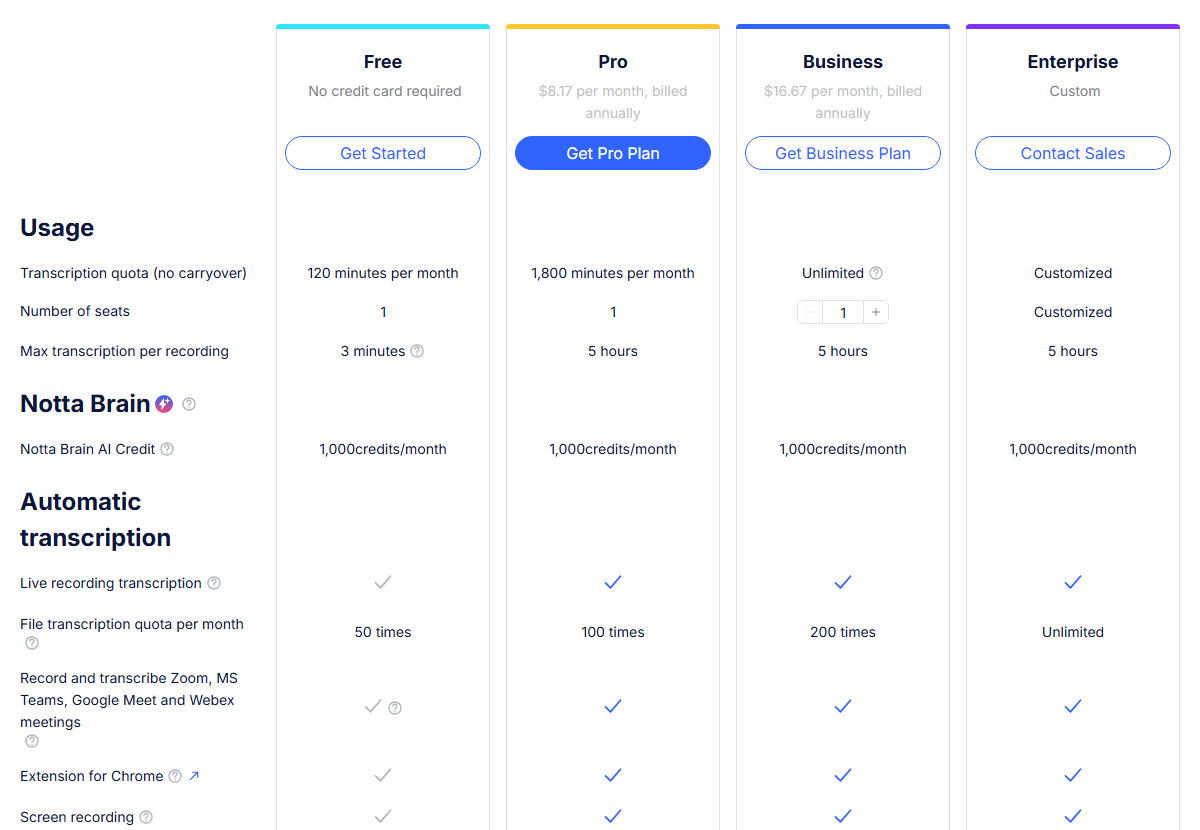
What costs extra
Three add-ons sit outside the plans, “Available exclusively to Pro, Business, and Enterprise plan users.” Monolingual real-time translation costs $6 a month billed yearly ($72) or $10 monthly; bilingual transcription and translation $9 a month yearly ($108) or $15 monthly. Without them, the comparison table allows real-time translation up to 2 times a month and bilingual transcription up to 4 times a month. Notta Brain Pro costs $93.59 a year, or $12.90 a month per the help center, for 8,000 AI credits a month.

Buying in the app costs more
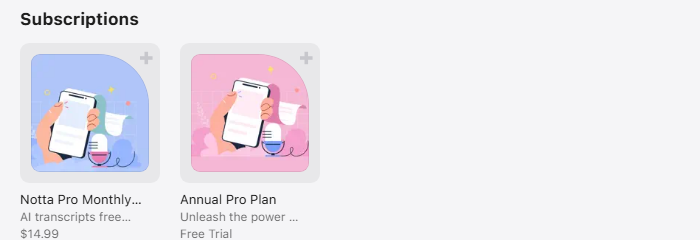
The help center warns: “If you purchase through the App Store or Google Play, the final price may differ from the Web version due to their payment systems.” On the US App Store on Oct 27, 2026, the Notta Pro Monthly Plan is listed at $14.99, against $13.49 on the web, and the in-app purchase list shows Annual Pro Plan options from $98.99 to $114.99, against $97.99 on the web. App subscriptions can only be managed and refunded through Apple or Google.
Students and teachers get 50% off the yearly Pro plan ($48.99) and the Business plan ($99.99 a year or $13.99 a month per seat), per the help center; the yearly Pro discount lasts one year and does not renew automatically.
Yearly billing saves about 40%. Pro costs about 27 cents per hour of meetings if you use all 30 hours.
Three things decide what you pay: the billing cycle, whether 30 hours a month is enough, and whether you want Notta Brain on top.
1. The free plan, in practice
The Free plan’s 120 minutes come with a 3-minute limit per recording. Notta’s plan guide spells it out: “a recording longer than 3 minutes exceeds the Free plan’s limit of 3 minutes per transcription. As a result, the full recording cannot be transcribed.” To use all 120 minutes you would need 40 separate recordings of 3 minutes each. The free plan also cannot download transcripts or recordings, per the comparison table. It works for testing accuracy on a short clip; it does not work for a real meeting.
2. Three worked examples
| Who | Plan | Cost | What to watch |
|---|---|---|---|
| Consultant with 20 one-hour calls a month | Pro, yearly | $97.99 a year; 1,200 of 1,800 minutes used | Translating a transcript uses the same minutes again: 20 translated calls would need 2,400 minutes |
| Researcher with 40 hours of interviews a month | Business, 1 seat, yearly | $199.99 a year, $102 more than Pro | Pro tops out at 30 hours and extra minutes cannot be bought on Pro |
| Sales team of 5 using bots on overlapping calls | Business, 5 seats | $999.95 a year, or $1,679.40 on monthly billing | One bot per seat: 5 meetings at once at most |
Calculated from the Oct 27, 2026 pricing page and the help center articles on usage rules (Oct 5, 2026), extra transcription time (Sep 15, 2026) and concurrent meetings (Dec 15, 2025); before taxes.
3. Notta Brain is a second subscription
Notta Brain answers questions across meetings and builds slides, images and Word or Excel files, priced in credits: 100 per question, 200 per image, 300 per slide deck, per the pricing FAQ and help center. The help center is blunt about plans: “Subscribing to a paid Notta plan alone does not provide additional Notta Brain credits.” So a Pro or Business user has 1,000 credits a month, about 10 questions, unless they add Brain Pro ($93.59 a year for 8,000 credits, about 80 questions). Pro plus Brain Pro comes to $191.58 a year at list price, or about $182 if the 10% bundle discount the help center describes applies to that price. Questions answered from public web search cost 0 credits.
The trial, refunds, cancellation, downgrades and price changes: the exact rules.
The web trial bills a year up front
Notta Web offers some free users a 3-day Pro trial with 300 minutes; it needs a card. The help center article (updated Oct 13, 2025) says: “The annual fee(97.99 USD) will be charged as soon as the 3-day trial ends.” Its own example: a trial ending at 14:00 on September 3 must be cancelled by 13:59 that day, and Notta recommends cancelling at least 24 hours early because status updates can lag. The app trial gives 1,800 minutes but must be cancelled at least 24 hours before it ends. The 7-day Business trial on the web (300 minutes) rolls into the Business Monthly Plan instead.
Refunds and cancellation
The help center article on refunds (updated Oct 26, 2026) says that for card payments on the web, “refunds are generally not provided for paid plans purchased through the Web platform”; app purchases go through Apple or Google. The cancellation article adds: “The remaining days of your subscription are non-refundable.” Deleting the app or your account does not stop billing, and a web subscription can only be cancelled on Notta Web on a computer. You keep paid features until the end of the term.

The Terms themselves do not contain a general no-refund clause, even though the help center cites them for one. What they do say: subscriptions renew automatically “under the exact same conditions unless you or we cancel it” (7.3); “Any Subscription fee change will become effective at the end of the then-current Billing Cycle.” (7.4), with no notice period stated; and if Notta terminates your account, “we will refund you any prepaid fees covering the remainder of the term” (8).
Switching plans and billing cycles
Upgrades apply immediately and credit the unused part of the old plan, but only on the same payment platform: Pro bought in the App Store or Google Play cannot be credited toward a web Business plan, and you claim the unused part back through a form. Downgrades and changes from yearly to monthly require cancelling and waiting for the term to end.
What happens to your data when you stop paying
Your transcripts stay stored, but a Free account “Can view the first 3 minutes” of each one, per the help center, and the pricing FAQ suggests exporting before you downgrade. Transcripts are kept indefinitely unless you delete them, the workspace or the account; deleted files sit in the trash for 30 days.
| Rule | Where it is written | Risk |
|---|---|---|
| Web trial charges $97.99 for a year when it ends | Help center, 3-day trial on Notta Web | High |
| Web purchases generally not refunded; remaining days not refunded | Help center, refunds (Oct 26, 2026) and cancellation (Oct 21, 2026) | High on yearly plans |
| After cancelling, only the first 3 minutes of each transcript are viewable | Help center, subscription expiry; pricing FAQ | Medium: export first |
| App store payments cannot be credited to a web upgrade | Help center, change plan (Oct 12, 2026) | Medium |
| Price changes apply from the next billing cycle, no notice period stated | Terms 7.4 | Low to medium |
Six places where two Notta pages, or a store listing, give different answers.
None is a reason to avoid Notta on its own. Together they mean you should check the rule that matters most to you before you pay for a year.
Swipe sideways to see both sides.
| Topic | One page says | Another page says | What we would assume | Risk |
|---|---|---|---|---|
| Free plan | Home page: “120 free minutes with full transcription” | Pricing card: “Up to 3 minutes per conversation” | Free transcribes 3 minutes of each recording | High |
| Accuracy | Home: “98%+ Accuracy Guaranteed”; bot-free page: “98.86% accuracy” | Help center: 90% or higher in formal meetings, 50% to 80% in casual ones | Plan for edits on informal calls | Medium |
| Refunds | Help center: refunds generally not provided “In accordance with our Terms of Service” | Terms: no general no-refund clause; refund only if Notta terminates | Do not expect a refund on web purchases | Medium |
| Custom vocabulary on Pro | Pricing table: 200 | Plan guide: 50 English words, 200 Japanese | 50 words if you work in English | Low |
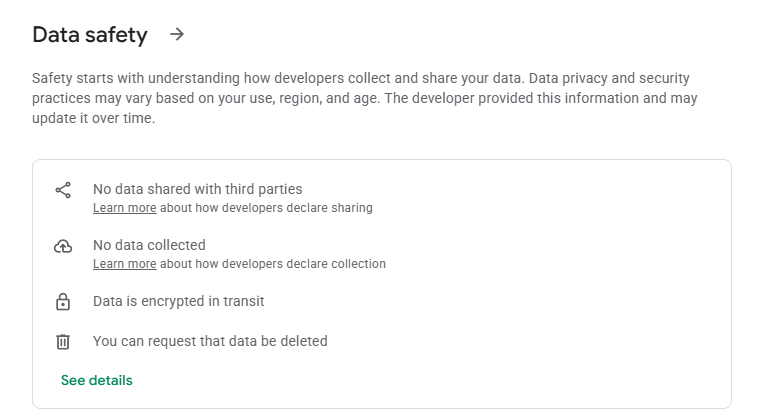
| Data collection | Google Play data safety: “No data collected” | Privacy policy: collects account details, audio and video inputs, usage and device data | Go by the privacy policy | Medium |
| Price of Pro | Web: $13.49 a month, $97.99 a year | US App Store: $14.99 a month; yearly options $98.99 to $114.99 | Subscribe on the web | Low |
Sources: notta.ai home, pricing and bot-free pages; help center articles on accuracy (Dec 15, 2025), refunds (Oct 26, 2026) and choosing a plan (Oct 20, 2026); Terms of Service (Sep 2, 2026); Privacy Policy (Sep 2, 2025); Google Play and App Store US listings; all as of Oct 27, 2026.
Answer five questions.
Transcription in many languages is the reason to buy. Brain is the new layer, metered separately.
The core is a transcript you can edit, search, bookmark and share, with speaker labels and timestamps. Notta transcribes 58 languages, can transcribe two languages in one recording, translate transcripts after the fact (Pro and up) and translate live. AI Notes turn a transcript into a summary with action items; Pro gets 100 a month and 5 custom templates, Business 200 per seat shared across the workspace and unlimited templates. A medical transcription engine and custom vocabulary (English and Japanese) help with specialist terms.
Notta’s own walkthrough shows the transcript editor: playback, speaker names, edits and highlights.
Notta Brain
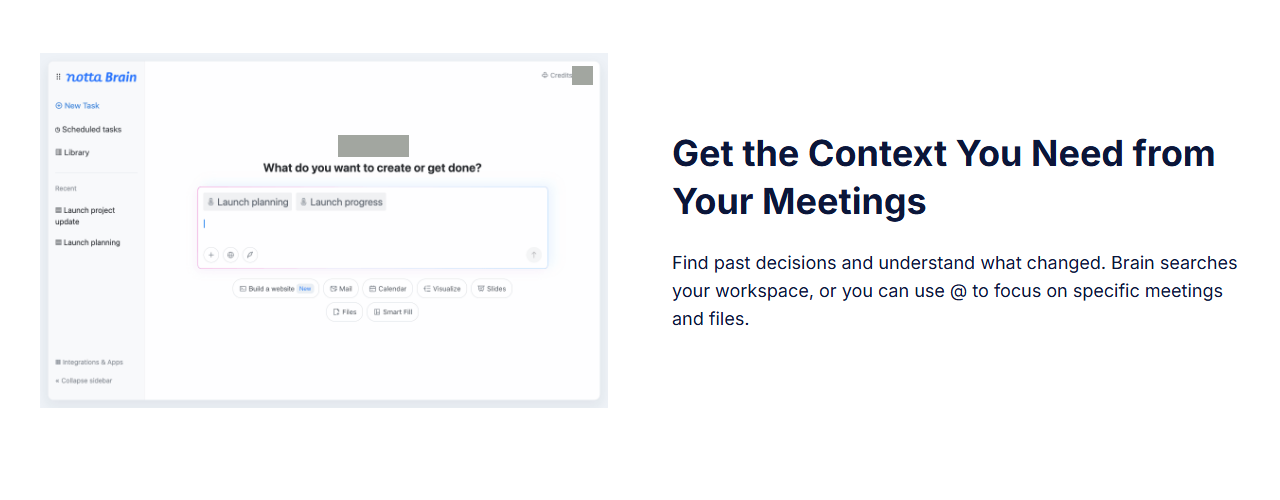
Notta Brain, renamed from AI Chat in early 2026, is a chat workspace over your meetings and files. You can point it at specific meetings with @, ask across many of them, and turn the answer into slides, infographics, images, emails or filled-in Word and Excel files; it also runs scheduled tasks and works in Slack.

| Brain action | Credits | On 1,000 free credits | On 8,000 Brain Pro credits |
|---|---|---|---|
| Question over transcripts or files | 100 | 10 | 80 |
| Image | 200 | 5 | 40 |
| Slide deck | 300 | 3 | 26 |
| Fill a Word or Excel file | 200 | 5 | 40 |
| Web-only question | 0 | no limit stated | no limit stated |
Credit costs from the help center article “Understand credits in Notta Brain” (Aug 4, 2026) and the pricing FAQ, Oct 27, 2026; counts are our own calculation for one action type at a time. Credits are charged only when a result is delivered; Brain Pro credits roll over up to one month’s allowance, free credits do not; free images carry a watermark.
From a meeting invite to shared notes, in five steps.
This is the path Notta’s help center describes for online meetings. Step 4 is the one people skip: summaries and action items are generated text and should be checked against the transcript before they go to a client.
Notta Desktop records without a bot in the room. The legal duty to tell people stays with you.
Notta Desktop, in beta for Mac and Windows and included on all plans, captures your computer’s audio instead of sending a bot. It works with “40+ meeting applications”, per its FAQ, including Slack Huddles, Discord and WhatsApp Desktop, needs macOS 13 or later for system audio, and labels speakers only as local and remote, where the bot can use meeting usernames.
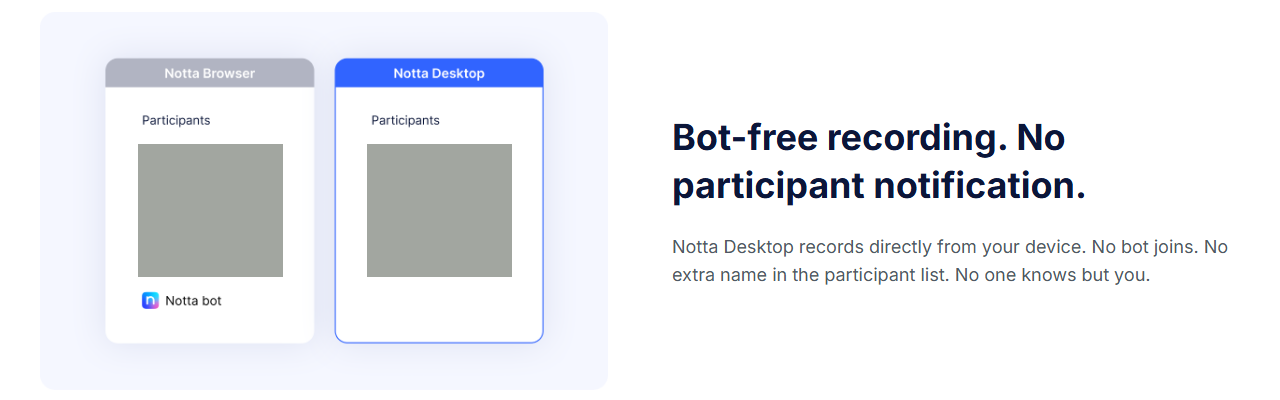
The marketing line, “No one knows but you.”, sits awkwardly next to Notta’s own rules. The same page’s FAQ says “You are still responsible for informing participants about recording in accordance with applicable laws and your company’s policy.”, and the Terms go further:

In places that require all-party consent, a visible bot is a reminder; a silent desktop recording is not. If you use bot-free mode, say so at the start of the call.
Privacy Mode keeps audio on your computer
On Pro and higher, Notta Desktop’s Privacy Mode transcribes entirely on your device with an offline model, saves files only to a local folder, and, per the help center (Sep 21, 2026), the content “is not used for AI model training”. Cloud summaries, sync and team features pause in that mode, and the offline model covers English, Japanese, Simplified Chinese and Cantonese.
Calendar and storage on Pro, CRM and Zapier on Business, and an MCP server for AI assistants.
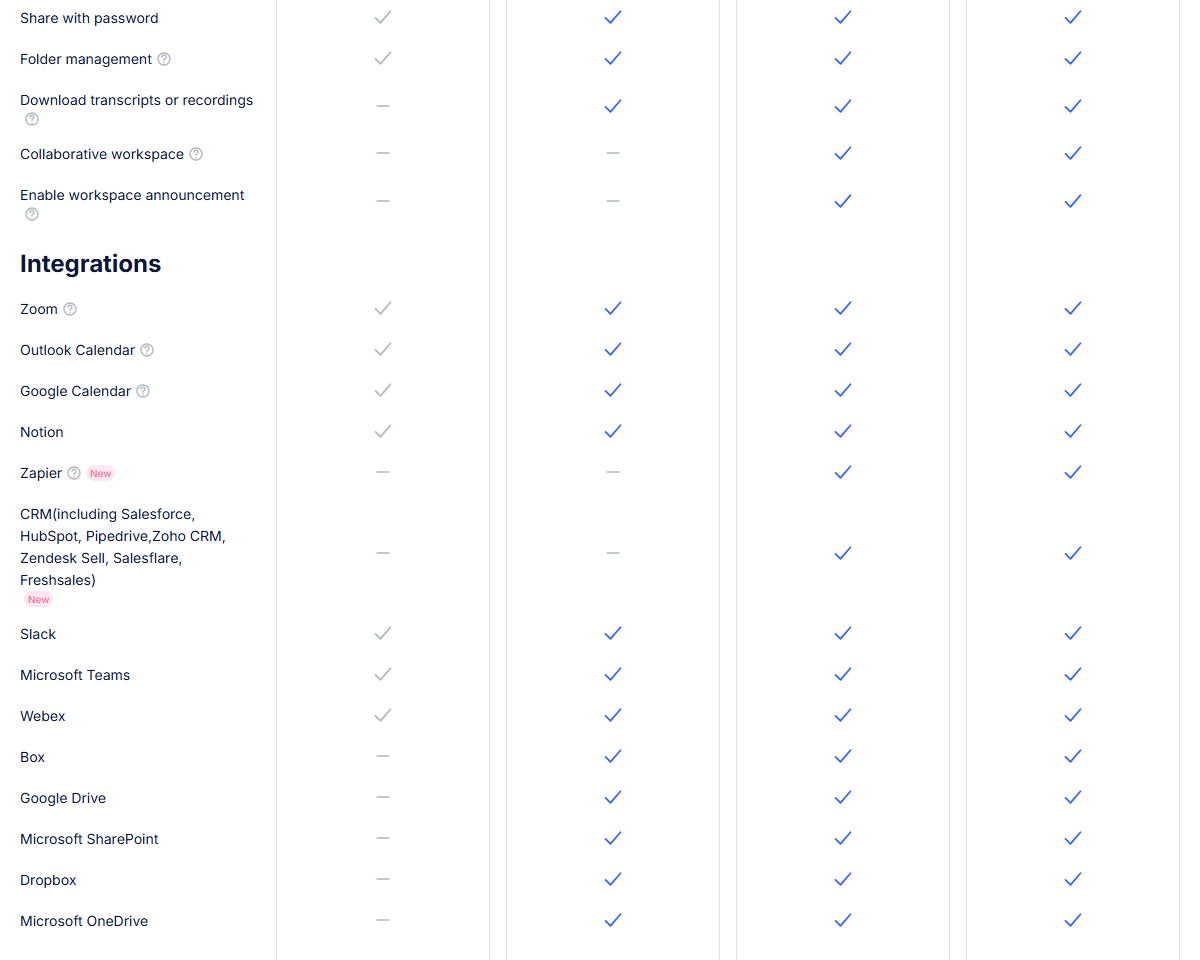
The comparison table puts Zoom, Teams, Webex, Slack, Notion and both calendars on every plan; Box, Google Drive, SharePoint, Dropbox and OneDrive from Pro; and Zapier plus CRM sync (Salesforce, HubSpot, Pipedrive, Zoho CRM, Zendesk Sell, Salesflare, Freshsales) only from Business.
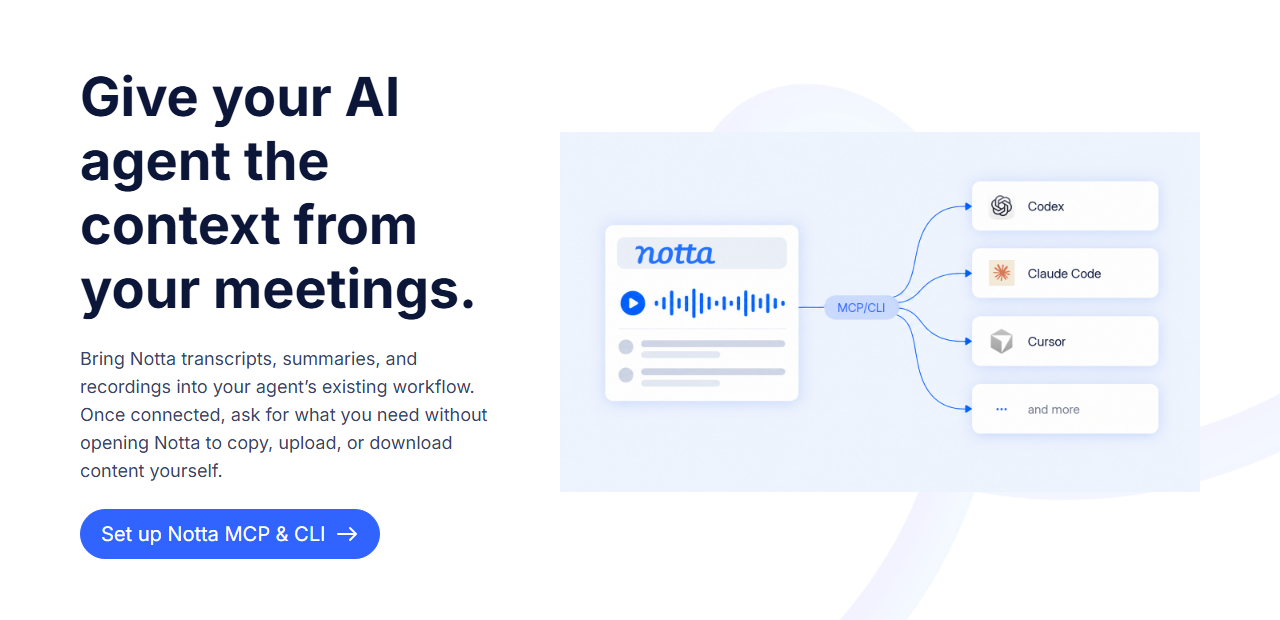
Notta MCP and CLI
Since April 2026 Notta has published an MCP server and a command-line tool on npm (@notta-labs/notta-mcp and @notta-labs/notta-cli). Per the setup guide (updated Oct 22, 2026), you need Node.js, install the tool from npm, add it to Claude Desktop, Cursor or Codex, and sign in through your browser. The assistant can then list recordings, read transcripts and existing summaries, upload local files for transcription and download exports, but only inside the upload and download folders you name. A separate remote MCP guide exists too. “Not every assistant supports MCP.”, the feature page notes; yours must support local MCP servers.

Swipe sideways to see the whole diagram.
Whatever the assistant reads becomes part of its context, and possibly of its provider’s logs, so client meetings travel further than Notta itself. For how connectors behave on the Claude side, see our Claude MCP connectors guide; developers who want raw speech-to-text rather than meeting notes may prefer an API such as Deepgram.
SOC 2 Type II and ISO 27001, AWS in Tokyo, and the strongest controls kept for Enterprise.
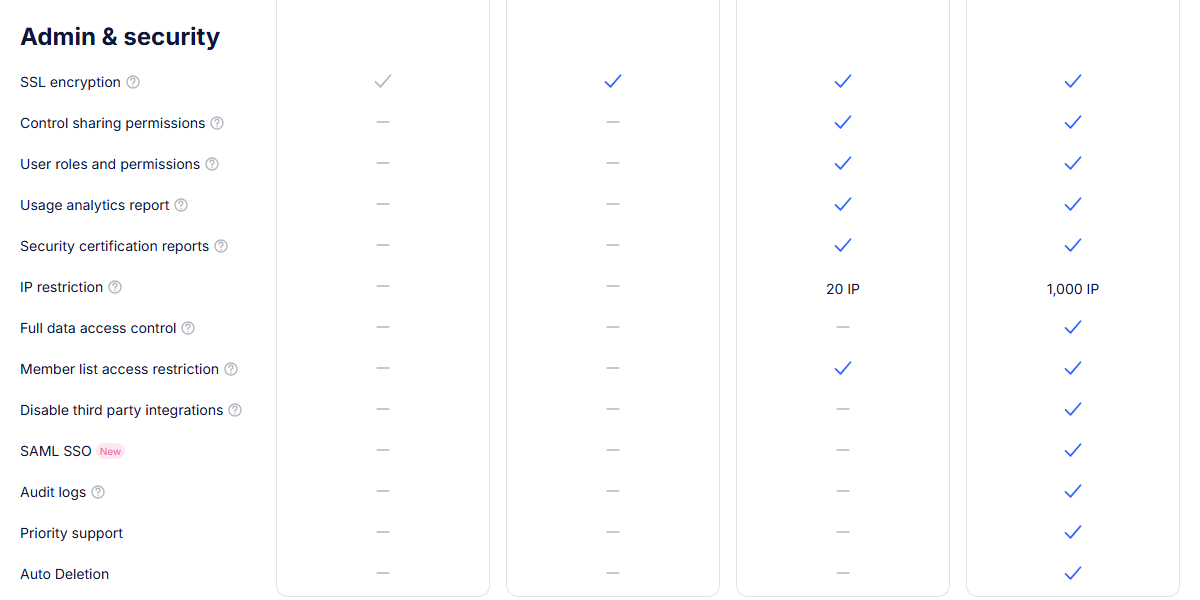
Notta’s security page lists SOC 2 Type II from an independent audit, ISO 27001, GDPR, CCPA and HIPAA (“Follow HIPAA guidelines”, worded as guidance rather than a certification). Data is encrypted with TLS 1.2 in transit and AES-256 at rest, hosted on AWS and backed up to S3 and Aurora. The help center adds: “Your data is stored in a data center located in Tokyo.” Security reports are available from Business up.

The admin controls climb steeply by plan. Business adds roles, sharing controls, usage reports and an allowlist of 20 IP addresses. SAML SSO, audit logs, auto-deletion, disabling AI features or third-party integrations, and “No data training” are listed for Enterprise only. Notta’s privacy policy (effective Sep 2, 2025) says it may use information “to evaluate and improve the Notta Service” and does not say whether recordings on Free, Pro or Business train AI models; Privacy Mode is the only paid-plan option Notta describes as excluded from training. If that matters, ask Notta in writing before you upload client calls.
Reliability is documented only by incident: a help center report describes a login outage on Mar 10, 2026 from 10:32 AM to 2:52 PM JST, caused by a third-party update, with no data affected. Notta does not link a public status page from its site or help center.
Swipe sideways to see every plan.
| Control | Free | Pro | Business | Enterprise |
|---|---|---|---|---|
| Exports and downloads | No | Yes | Yes | Yes |
| Privacy Mode (on device) | No | Yes | Yes | Yes |
| Roles, restrict public links | No | No | Yes | Yes |
| IP allowlist | No | No | 20 | 1,000 |
| SAML SSO, audit logs | No | No | No | Yes |
| “No data training” | Not stated | Not stated | Not stated | Yes |
Sources: pricing comparison table and help center articles “What is included in each Notta plan?” (Oct 15, 2026), “Security & Privacy” (Dec 2, 2025), “What is Privacy Mode Recording?” (Sep 21, 2026) and “Data security and privacy policy” (Aug 24, 2026).
Work pattern, fit and likely plan.
| If you are | Fit | Likely plan |
|---|---|---|
| A freelancer or consultant with up to 30 hours of calls a month | Strong: low price, exports, templates | Pro, yearly |
| Someone whose meetings mix two languages | Strong: bilingual transcription is unusual | Pro plus the bilingual add-on |
| A researcher or journalist transcribing long interviews | Good; above 30 hours a month you need Business | Pro or Business |
| A sales team that wants CRM sync | Fair: CRM and Zapier only on Business | Business |
| A regulated company that needs SSO, audit logs and no training | Only on Enterprise | Enterprise, 51+ seats |
| Anyone who wants free meeting notes | Weak: 3 minutes per recording | A different tool |
Eight real drawbacks.
- Low price: $8.17 a month yearly for 30 hours
- 58 languages, bilingual meetings, live translation
- Bot or bot-free capture, plus phone and uploads
- Recordings up to 5 hours on paid plans
- On-device Privacy Mode on Pro
- MCP server and CLI for AI assistants
- Free plan cut to 3 minutes per recording
- Web purchases generally not refunded
- Brain credits billed separately
- Accuracy claims inconsistent
- SSO, audit logs and no-training on Enterprise only
- Email-only support, business hours
- The free plan is a sample. 120 minutes, but 3 minutes per recording and no downloads.
- The trial bills a year. The web trial charges $97.99 the moment it ends unless cancelled.
- No refunds on the web, in practice. The help center says refunds are “generally not provided”, and remaining days are not refunded.
- Two meters for AI. AI summaries count against your plan; Notta Brain uses separate credits that a paid plan does not raise.
- Translation doubles minute use. Translating or re-transcribing a recording consumes its full length again.
- Accuracy depends on the meeting. 98%+ on the home page, 50% to 80% for casual meetings in the help center.
- Compliance features sit at 51 seats. SAML SSO, audit logs, auto-deletion and a no-training commitment are Enterprise-only.
- Store reviews report stopped recordings and slow support. Several App Store and Google Play reviews describe recordings ending early; support is email only, during business hours.
Otter, Fireflies, Fathom and tl;dv, priced on the same day.
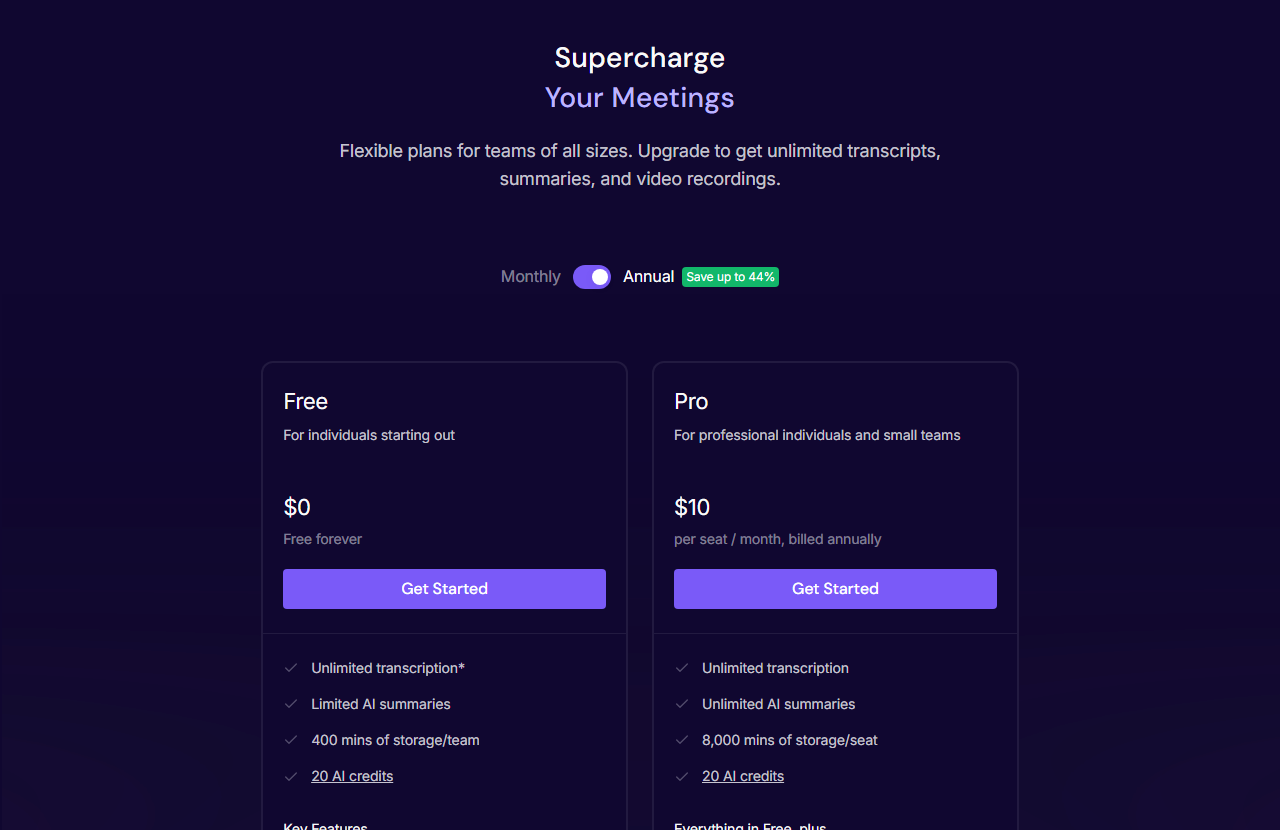
Each tool meters something different (minutes, storage, AI credits, seats), so these entry prices are not like-for-like. All figures are from each vendor’s pricing page on Oct 27, 2026.
Swipe sideways to see every column.
| Need | Product | Entry paid plan (monthly / yearly per month) | Free plan | JAVIS review |
|---|---|---|---|---|
| Many languages, low price | Notta | Pro $13.49 / $8.17 | 120 min, 3 min per recording | This review |
| Established English notetaker | Otter | Pro $16.99 / $8.33 (monthly shown at $8.49 in a promotion) | 300 min, 30 min per conversation | Not yet |
| Team notes and integrations | Fireflies | Pro $18 / $10 | “Unlimited transcription*”, 400 min storage per team | Not yet |
| Free notes for calls | Fathom | Premium $20 / $16 | Unlimited recordings and transcriptions | Not yet |
| Free notes with recordings | tl;dv | See our review | See our review | tl;dv review |
| Cleaner audio plus notes | Krisp | See our review | See our review | Krisp review |
Sources: notta.ai/en/pricing, otter.ai/pricing, fireflies.ai/pricing and fathom.ai/pricing, Oct 27, 2026. Fathom’s yearly figure is the price its page shows for annual billing.

If you mostly need noise removal on calls with notes as a side feature, our Krisp review covers that route; if you want a free notetaker that keeps recordings, start with our tl;dv review.
This review has no affiliate links.
Every Notta link here goes straight to notta.ai, its pricing page or its Terms of Service, without tracking parameters. The score, the drawbacks and the alternatives would be the same either way.
How this review was put together: Notta’s pricing page and full comparison table, add-ons and FAQ; help center articles on plans and pricing, choosing a plan, trials, refunds, cancellation, plan and billing changes, subscription expiry, usage rules, accuracy, languages, Notta Brain credits and subscriptions, MCP and CLI setup, bot-free recording, Privacy Mode, security, data storage, concurrent meetings and the Mar 10, 2026 incident; the Terms of Service, privacy policy and security page; the home, about, bot-free, Notta Brain and MCP pages; two official Notta videos; Internet Archive copies of the pricing page from Mar 19, 2024 to Oct 15, 2026; US App Store, Google Play and Chrome Web Store listings; Hacker News; the npm registry; and the pricing pages of Otter, Fireflies and Fathom, as of Oct 27, 2026. This review is not hands-on tested: no Notta account, no recording, no trial and no support contact. Screenshots show public pages only.
Other meeting tools, speech APIs and AI assistants.
Each card opens a published JAVIS review, routed by where you are.
Questions people ask before choosing Notta
Is Notta free?
There is a Free plan with no time limit and no card: 120 transcription minutes a month, 50 uploads and 10 AI summaries, but each recording is transcribed only up to 3 minutes and transcripts cannot be downloaded. For full meetings you need Pro or higher.
How much does Notta cost?
Pro is $8.17 a month billed yearly ($97.99) or $13.49 monthly; Business is $16.67 per seat a month billed yearly ($199.99) or $27.99 monthly; Enterprise is quoted from 51 seats. Prices exclude taxes, and app store prices are higher. Translation add-ons and Notta Brain Pro cost extra.
Can I get a refund?
For web purchases, Notta’s help center says refunds are generally not provided, and unused days after cancelling are not refunded. App Store and Google Play purchases are refunded, if at all, by Apple or Google.
Does Notta join meetings as a bot?
It can: the Notta bot joins Zoom, Google Meet, Teams and Webex as a visible participant. Notta Desktop for Mac and Windows records without a bot. Either way, Notta’s Terms make you responsible for telling participants they are being recorded.
How accurate is Notta?
Notta’s home page claims 98%+; its help center estimates 90% or higher for formal meetings and 50% to 80% for casual ones, and says accuracy drops sharply when audio is not captured clearly. We have not tested it.
Does Notta use my recordings to train AI?
The privacy policy does not say either way for standard plans. Notta lists “No data training” as an Enterprise feature, and says on-device Privacy Mode content is not used for training. Ask Notta in writing if it matters to you.
Does Notta work with Claude or ChatGPT?
Notta publishes an MCP server that works with assistants supporting local MCP servers, such as Claude Desktop, Cursor and Codex, plus a CLI. Both need Node.js and a Notta sign-in.
Where this came from, and when.
Every price, limit, rule and rating in this review comes from the pages below, as of Oct 27, 2026 unless another date is given. Expand for the full list, the scoring method and what the review does not cover.
Show sources, scoring method and scope
Pricing: notta.ai/en/pricing (cards, add-ons, comparison table and FAQ); Internet Archive copies of notta.ai/en/pricing from Mar 19 and Apr 29, 2024; Jan 24, Apr 1, Jun 16, Sep 18, Oct 13 and Dec 1, 2025; Feb 9, Jun 30, Aug 23, Sep 23 and Oct 15, 2026.
Help center (support.notta.ai): Understand Notta’s Plans Pricing (Sep 5, 2026); How to choose a Notta Plan? (Oct 20, 2026); What is included in each Notta plan? (Oct 15, 2026); Do you offer refunds? (Oct 26, 2026); Cancel your Notta subscription (Oct 21, 2026); What is the 3-day Free Trial on Notta Web? (Oct 13, 2025); the 3-day trial on the app (Oct 21, 2026); the 7-day Business Trial (Oct 13, 2025); trial and Free Plan differences (Oct 6, 2026); How long is the Free Plan free of charge? (Oct 13, 2025); Change your subscription plan (Oct 12, 2026); Change your billing cycle (Aug 25, 2026); subscription expiry (Oct 13, 2025); storage period (Dec 15, 2025); Usage calculation rules (Oct 5, 2026); buying more transcription time (Sep 15, 2026); unused minutes (Oct 13, 2025); accuracy (Dec 15, 2025); languages (Sep 23, 2026); Understand credits in Notta Brain (Aug 4, 2026); Notta Brain Subscription & Payment (Jul 3, 2026); Free vs Paid Brain (Jun 16, 2026); Set up Notta MCP and CLI (Oct 22, 2026); Notta Remote MCP guide (Oct 13, 2026); What is Bot-Free Recording? (Sep 2, 2026); Notta Desktop vs Notta Bot (Jul 22, 2026); What is Privacy Mode Recording? (Sep 21, 2026); Security & Privacy (Dec 2, 2025); Data security and privacy policy (Aug 24, 2026); concurrent meetings (Dec 15, 2025); educational discount (Oct 8, 2026); 24/7 customer service (Dec 15, 2025); March 10, 2026 incident report (Mar 12, 2026). All as read on Oct 27, 2026.
Legal and security: Terms of Service (effective Sep 2, 2026), sections 2, 3.1, 3.3, 5, 7.2 to 7.4 and 8; Privacy Policy (effective Sep 2, 2025); notta.ai/en/security.
Product and company: notta.ai home, about, bot-free, Notta Brain and MCP pages; npm registry entries for @notta-labs/notta-mcp and @notta-labs/notta-cli.
Video: two videos from the official Notta YouTube channel (@Notta-Official, linked in the notta.ai footer): pqv5NMXTJpw (How to Use Notta - AI | Editing transcripts, Aug 8, 2025) and vyro9MxtfhA (AI Chat is now Notta Brain, Mar 4, 2026).
Independent evidence: Apple App Store US listing (4.1 from 1,466 ratings; in-app purchase list; reviews dated Aug 7, 2026, Apr 1, 2026 and Dec 27, 2025); Google Play US listing (4.1, 21.5K reviews, 1M+ downloads; reviews dated May 16, 2026 and Nov 5, 2024); Chrome Web Store listing (2.8 from 44 ratings, 100,000 users); Hacker News items 40716905 and 44174667.
Competitors: otter.ai/pricing, fireflies.ai/pricing and fathom.ai/pricing (Oct 27, 2026).
Fit score, 67 out of 100: five criteria worth 20 points each. Price clarity 13 (yearly prices clear and stable, monthly prices only in the help center, higher app store prices); capability 16 (58 languages, bilingual and live translation, bot and bot-free capture, Privacy Mode, Brain, MCP; free plan unusable for meetings); independent evidence 12 (large store samples averaging 4.1, a weak extension rating, few independent written reviews); terms, data and security 12 (SOC 2 Type II and ISO 27001, but web refunds generally not given, trial bills a year, training stance only explicit on Enterprise, store data declaration at odds with the privacy policy); cost and fit 14 (among the cheapest paid plans we priced). Editorial judgment from published facts, not a hands-on test.
Not covered: transcription accuracy on real meetings, speaker separation, summary quality, Notta Brain output, the MCP server in use, mobile app stability, Notta Memo hardware and support response times, none of which can be judged without an account. tl;dv and Krisp prices are in their own JAVIS reviews.