
Browse AI Review 2026: No-Code Scraping That Now Starts With an AI Agent, and a Credit Bill You Should Model First
Browse AI lets people who do not write code pull data off websites into a spreadsheet, and then watch those pages for changes. You build a "robot" for a page, run it once, in bulk, or on a schedule, and send the rows to Google Sheets, Airtable, Zapier, Make, a webhook or the API. In September 2026 it changed how robots are built: a beta AI builder called Table Studio is now the first option, and the old Chrome extension is the last resort. This review explains what you pay as of Oct 4, 2026, how credits are really counted, where the product falls short, and when Apify, Octoparse, Bardeen or Firecrawl fit better.
| Made by | Browse AI Inc., Vancouver, Canada; launched Sep 2021 |
| What it is | No-code robots that extract and monitor website data |
| Free | 50 credits a month, 2 websites, no card |
| Cheapest paid | $19/mo billed yearly ($228), or $48 month to month |
| Credit rule | 10 rows or 1 screenshot = 1 credit; Premium sites cost 2 to 10x |
Browse AI is the gentlest way for a non-developer to get website data into a sheet and keep it current. The risk is not the setup, it is the credit math once you start monitoring.
"Building a robot is the easy part. The question that decides whether Browse AI is cheap or expensive is how many pages you check, how often, and whether the site is on the Premium list."
Here is how I read it. Browse AI sells one idea: point it at a page, approve the columns, and you have a live dataset without touching code. The pieces around that idea are mature. Monitors re-check pages on a schedule and highlight what changed, bulk runs take a CSV of up to 500,000 inputs, workflows chain a list robot to a detail robot, and the results flow to Google Sheets, Airtable, Zapier, Make, Amazon S3, webhooks or a REST API that every plan includes. What is new is the build step. Since September 2026 the recommended path is Table Studio, a beta AI agent that reads the page and proposes the table for you to review. Pricing is a pool of credits: ten rows or one screenshot per credit, with a minimum per task and a higher minimum on "Premium" sites such as Amazon, LinkedIn and Google. That model is fair for small, steady jobs and painful for frequent checks on many pages. This is an editorial review built on Browse AI's pricing page (both billing options), its help center and legal terms as of Oct 4, 2026, its official videos, Trustpilot, the US Chrome Web Store listing and Hacker News. No hands-on test of Browse AI was run for this article.
A robot learns one page layout. Everything else decides when it runs and where the rows go.
A robot is a trained extractor for one layout on one website. You can build it three ways (Table Studio, Robot Studio or the Chrome extension), start from one of 250+ prebuilt robots that Browse AI maintains, or pay for the managed Premium service. Each time a robot visits a page it runs a task, and every task costs credits. Results land in a Table inside Browse AI, which you can filter, export as CSV or JSON, enrich with AI-written formula columns, or push to other tools.
Map built from Browse AI's pricing page and help center articles on robots, Table Studio, bulk runs, workflows, monitors and integrations, Oct 4, 2026.
A Vancouver company that started self-funded in 2020, took outside investment from 2021, and became one of the best-known no-code scrapers. Its numbers are large; most are its own.
770,000+ on the homepage and pricing page, 800K+ on the About page, Oct 2026. Sign-ups, not paying customers.
Homepage counter (10,136,253,507), Oct 4, 2026; the About page says 9B+. Lifetime total, not a monthly rate.
Chrome Web Store listing, US storefront, Oct 4, 2026. Extension users, not customers; the extension is now a fallback trainer.
Browse AI job post on Hacker News, Feb 3, 2025, alongside "500,000+ users". Self-reported and 20 months old.
| When | What happened |
|---|---|
| Jan 2020 | "Started with 2 team members, self-funded". |
| Jul 2021 | XX accelerator in San Francisco; "XX made the first investment in Browse AI". |
| Sep 2021 | Public launch on Product Hunt. |
| Feb 2022 | Investment from Angels of Many, the second investor; the team grew to 12. |
| Aug 2022 | 10,000 users; Zapier becomes the third investor. |
| Aug 2023 | Breakeven at 250,000 users and US$2.8M raised from investors including cofounders of Dropbox and DoorDash. |
| Nov 2024 | Last Chrome extension update (version 2.2.3). |
| Mar 25, 2025 | SOC 2 Type II audit completed. |
| Jul 17, 2025 | Plan changes now charge the full new price at once and carry unused credits over for one cycle. |
| Sep 2026 | Table Studio (beta) on for every account; the Chrome extension becomes the last-resort trainer. |
The happy users say it saves days. The unhappy ones describe robots that fail, slow support, and billing they did not expect.
57% one-star, 29% five-star; 3 reviews in the last 12 months.
Extension listing, Oct 4, 2026.
Calls the web app "by far the most powerful scraper i have used" for many differently formatted, often changing sites. "Yes, it is pricey", but the work "simply would not get done" without it, and support has been "exemplary".
A US user (Apr 16, 2026) calls it "glitchy" with a "lack of updates" and says Claude-style AI tools now do much of the job. Another (Oct 24, 2025) says runs failed in both the Chrome extension and the AI Studio page on Reddit and Facebook pages, or returned gibberish. One (Aug 30, 2025) reports "Errors 98% of the time".
An Australian user who forgot to cancel a roughly 75 AUD plan got a refund on request: "Very ethical" (Aug 16, 2025). Older 2023 reviews describe charges after cancelling and unanswered emails; Browse AI replied in Jan 2024 that refunds were issued and that its support team had not kept up with growth.
Four tiers, two billing modes, and a credit dropdown on each paid plan. Annual is 20% cheaper and hands you the whole year of credits on day one.
Free
50 credits a month, no credit card.
- 2 websites, 3 users
- Unlimited robots, all features
- Monitors no more than hourly
Personal
Billed yearly ($228) for 12,000 credits up front, or $38/mo ($456) for 24,000. Month to month: $48 for 2,000 credits a month.
- 5 websites, 3 users
- Monitors every 5 minutes
- Basic email support
Professional
Billed yearly ($828) for 60,000 credits, up to $319/mo for 360,000. Month to month: $87 to $399.
- 10 websites, 10 users
- Priority email support
- Cheaper add-on credits
Premium
Annual contract only, 600,000+ credits a year.
- Custom websites and users
- Browse AI builds and maintains robots
- Dedicated account manager
Swipe the table sideways to see every column.
| Plan and credits | Billed yearly | Same credits, monthly | Yearly saving | Cost per credit (yearly / monthly) |
|---|---|---|---|---|
| Personal 12,000 a year | $19/mo ($228) | No monthly option | n/a | $0.019 / n/a |
| Personal 24,000 a year (2,000 a month) | $38/mo ($456) | $48/mo ($576) | $120 | $0.019 / $0.024 |
| Professional 60,000 (5,000 a month) | $69/mo ($828) | $87/mo ($1,044) | $216 | $0.0138 / $0.0174 |
| Professional 120,000 (10,000 a month) | $129/mo ($1,548) | $162/mo ($1,944) | $396 | $0.0129 / $0.0162 |
| Professional 240,000 (20,000 a month) | $239/mo ($2,868) | $299/mo ($3,588) | $720 | $0.0120 / $0.0150 |
| Professional 360,000 (30,000 a month) | $319/mo ($3,828) | $399/mo ($4,788) | $960 | $0.0106 / $0.0133 |
Two things the plan cards do not shout. First, the $19 price only exists on a yearly commitment; the cheapest month-to-month plan is $48. Second, "websites" means unique root domains: shop.com, shop.com/sale and uk.shop.com are one website, and you can free a slot only by deleting every robot for that domain.
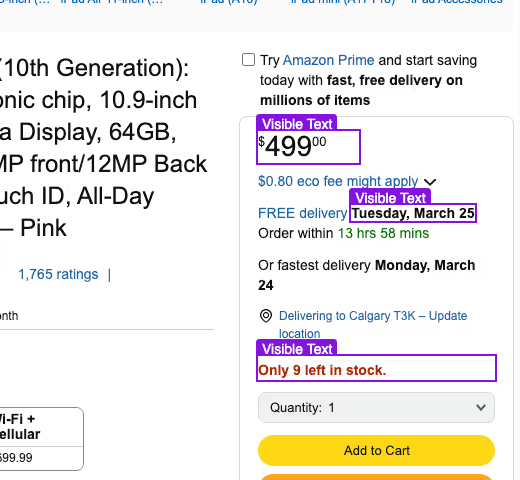
Ten rows, one screenshot or one minimum per task: whichever is higher. Premium sites raise that minimum to between 2 and 10.
Browse AI's pricing FAQ puts it in one line: "With each credit, you can extract 10 rows of data from a page or capture a screenshot." The help center adds the rule that changes real bills, the per-task minimum. Visiting 20 product pages for one field each costs 20 credits, not 2.
| What the task does | Standard site | Premium site |
|---|---|---|
| Minimum per task | 1 credit | 2 to 10 credits |
| 10 rows of a list | 1 credit | 2 to 10 credits |
| 1 screenshot | 1 credit | 2 to 10 credits |
| 10 single captured texts | 1 credit | 2 to 10 credits |
The rules on leftovers, top-ups and plan changes, in Browse AI's words
| Question | Official answer |
|---|---|
| Do credits roll over? | "No. Credits reflect your usage limit within your billing period (either monthly or annual)." The pricing FAQ adds that unused credits "will not be carried over, unless before the billing cycle ends, the plan is upgraded". |
| Can I buy more? | Yes, one-time add-on credits on any paid plan, minimum 1,000. Pricing page: $0.024 (Personal, yearly), $0.030 (Personal, monthly), $0.017 to $0.013 (Professional, yearly), $0.022 to $0.017 (Professional, monthly). |
| Yearly plan, monthly cap? | None. "For annual plans, you get all of the credits upfront", to use in any pattern over 12 months. |
| Upgrade or downgrade? | "You will be charged the full price of your new plan right away, regardless of whether you upgrade or downgrade." Unused credits are added for that first cycle, and the billing date resets. |
| Overage? | Browse AI documents no automatic pay as you go, only one-time top-ups and upgrades. Its bulk run guide warns that failures "may indicate insufficient credits", so plan for tasks to stop when the balance is empty. |
What typical jobs cost
| Job | Credits | Plan that covers it |
|---|---|---|
| One list of 100 products plus each product page, once (Browse AI's own example) | 110 | Free covers it over three months; any paid plan at once |
| Check 50 product pages on a normal store once a day | ~1,500 a month | Personal monthly ($48) or Personal 24,000 yearly ($456) |
| The same 50 pages on Amazon (Premium) | ~3,000 to 15,000 a month | Professional $87 to $299 a month, depending on the Premium multiplier |
| One page checked every 5 minutes | ~8,640 a month | Professional 10,000 monthly ($162) |
| One-off bulk run over 10,000 detail pages | 10,000 | Personal 12,000 yearly ($228), which Browse AI recommends for one-off projects |
Answer three questions before you pick a plan.
Yes: Table Studio can likely build it in minutes. No, it needs clicks, forms or a password: plan on Robot Studio. Banking-grade, MFA or custom-CAPTCHA sites: Browse AI says these may not work at all.
Under ~1,000 on ordinary sites: Personal. Daily checks on dozens of pages or any Premium site: Professional. Hundreds of thousands of pages: compare Firecrawl or Apify first.
One project: a yearly plan gives all credits on day one (cancel before renewal). Ongoing but uncertain: start monthly at $48 and move to yearly once usage is stable.
If yes, a developer API such as Firecrawl or an Apify Actor is usually cheaper per page. Browse AI's value is that you do not have to.
In 2026 you describe the table and an AI agent proposes it. You still approve every column before anything runs.
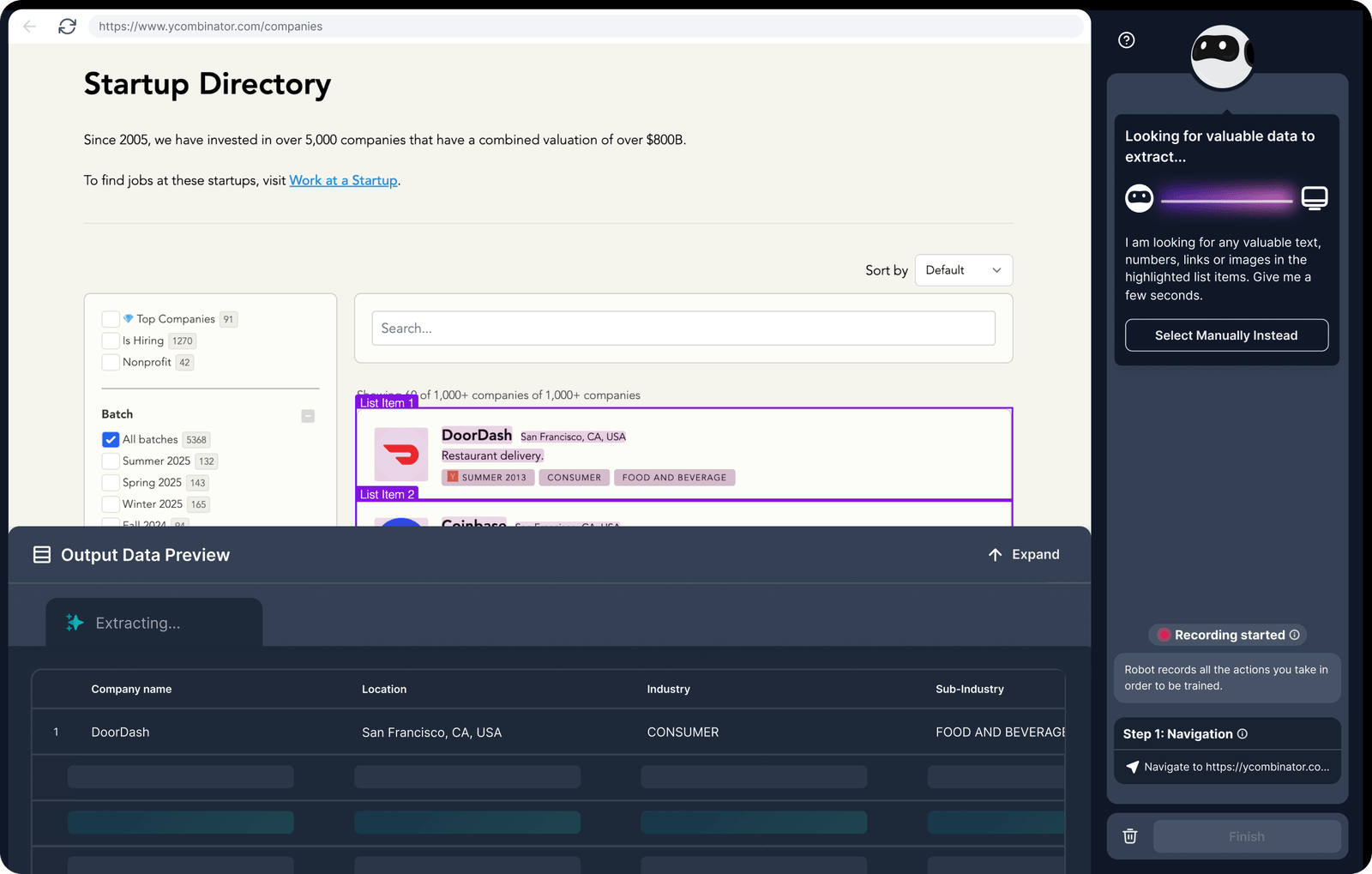
When you click Build New Robot you choose Extract structured data or Monitor site changes, enter the page address, and pick a trainer. Browse AI's help center is now explicit about the order: "If you are not sure, start in Table Studio. Switch to Robot Studio if the page needs clicks, typing, or a password login." The Chrome extension is for when both fail.
| Trainer | Use it when | Limits |
|---|---|---|
| Table Studio (AI, beta) | The data is visible as soon as the page loads: listings, directories, search results, articles. Works with a session-cookie login. | Not available with password login, clicks or form input. Takes 5 to 10 minutes to propose a table. |
| Robot Studio (point and click) | You must click, type, paginate, fill a form or log in with a password. | Manual training; retrain when a site changes beyond what auto-adaptation handles. |
| Chrome extension | Neither studio can train the site. | Last updated Nov 2024; 3.9 stars from 45 ratings. |
Table Studio loads the page, works out which values appear once and which repeat as lists, proposes tables and columns, and fills them with sample rows. You can add a column in plain language ("the listed price before any discount"), delete what you do not need, and cap a list at 50, 500, 5,000 or any number. Browse AI's FAQ answers the obvious worry directly: "Is an AI guessing at my data? It proposes the tables and columns and shows you real extracted sample data; you review, refine, and approve before the robot is saved." Browse AI lists no separate charge for building; once saved, the robot "consumes credits like any other Browse AI robot".
Official Browse AI video (Sep 2, 2026, 8 min 29 s): the full Table Studio flow from a URL to a saved robot, the same video Browse AI embeds in its Table Studio guide. Watch on YouTube.
List robot, detail robot, a filter between them, and a destination at the end.
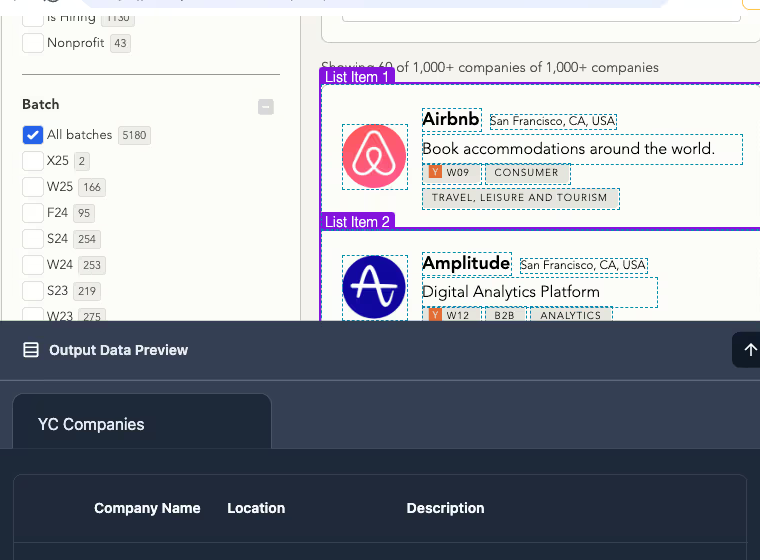
Most useful jobs need two robots: one that reads a list page (products, jobs, companies) including each item's link, and one that opens each link for the details. Browse AI calls the connection a workflow and the result deep scraping. A filter decides when robot B runs: always, or only when robot A's monitor finds new or changed items, which is how you avoid paying to re-read unchanged pages.
-p-800.png)

Workflow drawn by JAVIS from Browse AI's help center articles on workflows, monitors and Google Sheets sync (Nov 2025 to Mar 2026). Credit notes use the published credit rules.
Monitoring is the reason many people stay, and the reason their credits disappear.
A monitor re-runs a robot on a schedule (hourly, daily, weekly, or down to every 5 minutes on paid plans; hourly is the floor on Free) and compares the result with the last run. Text monitors flag added, changed and removed rows in green, yellow and red. Screenshot monitors compare images at a sensitivity you choose: small (1%), medium (5%) or large (10%) change. Alerts go by email, webhook or into a connected tool, and change history is kept in your Table. Data retention on Free, Personal and Professional is 90 days.
Official Browse AI video (Nov 3, 2023, 4 min 54 s), still the one Browse AI embeds in its monitoring guide. The robot builder shown is older than Table Studio; the monitoring steps match today's help center. Watch on YouTube.
| Feature | What Browse AI documents | Cost to watch |
|---|---|---|
| Monitors | Several per robot; schedule, timezone, days of week; email, webhook or integration alerts | Every check is a task. 12 checks an hour is ~8,640 a month for one page. |
| Bulk runs | Upload a CSV of up to 500,000 input sets; each becomes a queued task | Credits per row or page; runs fail if credits run out |
| Workflows | Chain list robot A to detail robot B, with change filters | Filter on "new or changed" to avoid re-reading pages |
| Auto-adapt | AI adapts robots to "most" layout changes and notifies you | Full redesigns still need a retrain |
| Task limits | 60-minute max task time on Free, Personal and Professional | Very long pages may need splitting |
Anti-bot handling, and where it stops
Robots open a real browser, scroll and click at human speed, rotate IP addresses (usually in the country of the person who built the robot), and solve supported CAPTCHAs such as reCAPTCHA and hCaptcha plus Cloudflare challenges. Residential proxies and the CAPTCHA solver are included on every plan. Browse AI is also candid about the limits: it does not solve custom CAPTCHAs, does not support MFA or 2FA logins, cannot handle virtual lists that only render visible rows, and says "a small number of high-security sites cannot be bypassed".

Every plan gets the same destinations. There is no first-party MCP server; AI tools connect through exports, Zapier or the API.
| Destination | How it works | Good for |
|---|---|---|
| Google Sheets | Native sync; choose changed or added, only changed, or only added rows; each run appends | The default for non-developers |
| Zapier | Triggers on monitor change, task done, success or failure; robots can also be started from a Zap | Slack, CRM, Excel, email alerts |
| Make, Pabbly, Integrately | Native modules or webhooks | Cheaper multi-step automations |
| Airtable, Amazon S3 | Native integrations; scheduled S3 exports | Bases and data lakes |
| Webhooks | Task finished, success, error, data changed, table export done (beta); sent from one fixed IP | Your own endpoint |
| REST API | All plans, no extra cost; run tasks, bulk runs, read results, manage webhooks and cookies | Apps and pipelines |
For AI, Browse AI positions itself as "the data layer" that feeds your models. Its help center shows exporting JSON for Claude, ChatGPT or Gemini, sending rows to an LLM through the API, and processing data in n8n. As of Oct 4, 2026 Browse AI does not document an MCP server of its own; a Browse AI connector is offered through Zapier MCP. If you want an assistant to call scrapers directly, our guide to Claude MCP connectors explains how that layer works, and Apify offers its own MCP server.
The API is free to use; the credits behind it are not. Annual plans are cheaper per credit and easier to burn through on purpose.
The REST API (v2, bearer-key authentication) can list robots, run a task, start a bulk run, fetch results, manage webhooks and update session cookies. It needs at least one approved robot, because the API runs robots you trained; it is not a generic "send any URL" scraper the way Firecrawl is. That shapes the economics: Browse AI charges by rows and tasks, so wide pages with many rows are cheap and many small pages are expensive.
| Lever | Effect on your bill |
|---|---|
| Yearly vs monthly | About 20% cheaper, and all credits arrive up front. The yearly Personal 12,000 tier ($228) has no monthly equivalent. |
| Bigger Professional tier | Cost per credit falls from $0.0138 (60,000) to $0.0106 (360,000) on yearly plans. |
| List pages instead of detail pages | 100 rows from one list page is 10 credits; the same 100 items from detail pages is 100. |
| Premium sites | Multiply every task by 2 to 10. Browse AI says large Premium users can ask support for caching or discounts. |
| Monitor frequency | Daily vs hourly on one page is 30 vs 720 credits a month. |
| Add-on credits | One-time, minimum 1,000: $24 on Personal yearly, $30 on Personal monthly. |
Browse AI secures its side well. The legal responsibility for what you collect is entirely yours, and its own terms are stricter than its marketing.
| Area | What Browse AI states |
|---|---|
| Certification | SOC 2 Type II audit completed Mar 25, 2025; report via trust.browse.ai. GDPR and CCPA listed. |
| Logins you record | Passwords encrypted with AES-256, decrypted only on its servers during a task; you and teammates cannot see them in the dashboard or API. |
| Infrastructure | AWS US data centers; Auth0 for Browse AI accounts. Encryption in transit: TLS 1.2 per the help center, TLS 1.3 per the homepage. |
| Support access | Support can open your robots only when you ask, with access monitored and logged. |
| Data retention | 90 days on Free, Personal and Professional. After cancellation, deleted from active systems within 90 days and backups within 4 months. |
| Team roles | Owner, Admin, Member; only Admins and Owners manage billing. |
Who is responsible for the scraping, in Browse AI's exact words
| Source | Exact wording |
|---|---|
| Terms of Service, Use of Services | "Our Services are a tool, but it is your responsibility to ensure that you are using our Services in a lawful manner that does not violate the rights of any third party, or that requires the bypassing of any authentication systems you are not authorized to use with automations." |
| Terms of Service, account rules | "You will not use the Services to access, collect or store any confidential, proprietary or personal information. You are solely responsible for ensuring that you have all the rights necessary to use, access and store any data on the Services." |
| Terms of Service, warranties | Your use shall not "in any manner violate the terms of use of any third-party website or social media platform". |
| Help center, data rights | "However, as the user, you remain responsible for ensuring your specific use case complies with all applicable laws and website policies." |
People who need fresh data from a handful of sites and would otherwise copy and paste it.
| Work pattern | Fit | Likely plan |
|---|---|---|
| Marketer or founder tracking 20 to 100 competitor pages weekly into a Sheet | Strong | Personal yearly |
| Sales ops building lead lists from public directories | Possible for business data only; the terms bar collecting personal information | Personal or Professional |
| E-commerce team watching prices daily on Amazon or Walmart | Works, but Premium multipliers add up | Professional; price it first |
| Agency running monitors for several clients | Limited by the 10-website cap | Professional plus extra websites, or Premium |
| Developer crawling hundreds of thousands of pages | Poor value | Use a developer API instead |
| Anyone needing logged-in social or banking data | Weak; MFA unsupported, account risk | Do not plan on it |
The limits that matter before you pay.
Every check is a task with a 1-credit minimum (2 to 10 on Premium sites). One page every 5 minutes is about 8,640 credits a month.
Unused credits reset each cycle. When they run out, tasks fail until you top up (minimum 1,000) or upgrade.
2, 5 or 10 root domains depending on plan. Agencies and comparison projects hit it quickly; extra sites cost $2.40 to $5 a month each.
No custom CAPTCHAs, no MFA or 2FA, no virtual lists, no direct iFrame interaction. User reviews describe failures on Reddit, Facebook and Skyscanner.
Table Studio became the default in September 2026 and is labelled beta. It cannot handle password logins or pages that need clicks.
Plan-change billing (terms vs help center), Professional add-on prices, Free "single website" vs 2, TLS 1.2 vs 1.3, and "200+" vs "250+" prebuilt robots.
Full refunds need a report to support within 14 days (monthly) or 30 days (yearly) that you could not get it working, or unused renewals within 60 days.
Only 14 Trustpilot reviews and 45 Chrome ratings, and both lean negative. The strongest praise comes from Browse AI's own site.
| Strengths | Weaknesses |
|---|---|
| Truly no-code, now with an AI table builder | Credit cost grows with frequency and Premium sites |
| Monitoring with change highlighting is built in | Small website caps per plan |
| API, webhooks, Sheets, Zapier, Make on every plan, including Free | No first-party MCP server for AI agents |
| Residential proxies and CAPTCHA solving included | Logged-in, MFA and custom-CAPTCHA sites unreliable |
| Clear 60-day renewal refund rule | Mixed public reviews and inconsistent help pages |
Pick by who will maintain the scraper and how many pages you need.
| Your need | Better fit | Why |
|---|---|---|
| A ready-made scraper for a big site (Google Maps, Instagram, Amazon) at volume | Apify | Thousands of maintained Actors, pay per event or usage, MCP server for agents |
| Point-and-click with a desktop app and local runs | Octoparse | Free desktop plan runs on your machine; 500+ templates on paid plans |
| Scraping inside your browser for sales prospecting and enrichment | Bardeen | 1 credit per row, enrichment built in, $10 entry plan |
| Clean page content for AI apps and RAG, through an API | Firecrawl | Any URL to Markdown or JSON, 1,000 free pages a month, cheap per page at scale |
| Fresh data from a few sites into a Sheet, with change alerts, no code | Browse AI | Monitors and integrations are the core product |
Swipe the table sideways to see every column.
| Tool | Free tier | Cheapest paid | Unit | Unused allowance |
|---|---|---|---|---|
| Browse AI | 50 credits a month | $19/mo yearly; $48 monthly | Credit = 10 rows or 1 screenshot | Resets each cycle |
| Apify | $5 of usage a month | $19/mo monthly ($17 yearly) | Prepaid usage dollars | Expires each cycle |
| Octoparse | Desktop, 10 tasks, local only | $69/mo yearly; $83 monthly | Tasks and cloud processes | Not a credit model |
| Bardeen | 100 credits a month | $10/mo (+100 credits) | Credit = 1 row (enrichment 3) | Expires each billing period |
| Firecrawl | 1,000 credits a month | $16/mo yearly (5,000 credits) | Credit = about 1 page | Rolls over one month on Scale only |
This review contains no affiliate links.
JAVIS has no affiliate arrangement with Browse AI, and every link to Browse AI in this article is a plain link to its official site. The score, drawbacks and alternatives were written from Browse AI's own pricing page, help center and terms, and from public user reviews, not from any deal with the company.
Start on the free plan, build one robot in Table Studio on a page you already check by hand, and watch the credit counter for a week before choosing a plan.
Open Browse AIRead the guide that matches your real question.
Choose the next articleBrowse AI sits between scraping platforms, automation tools and AI assistants.
Every card below links to a published JAVIS article.


Card images are official product images.
Questions people are actually asking
Is Browse AI free?
Yes, there is a free plan with 50 credits a month, 2 websites, 3 users and every feature, with no credit card. Monitors on Free run no more often than hourly. 50 credits is about 500 rows from list pages.
How much does Browse AI cost in 2026?
Personal is $19 a month billed yearly ($228 for 12,000 credits) or $48 month to month for 2,000 credits a month. Professional is $69 to $319 a month billed yearly, or $87 to $399 monthly. Premium starts at $500 a month on an annual contract. Yearly billing saves about 20%.
What uses a credit?
Ten rows, one screenshot or ten single texts cost one credit, with a minimum of one credit every time a robot visits a page. Premium sites such as Amazon, LinkedIn and Google cost 2 to 10 credits per task.
Do unused credits roll over?
No. They reset at the end of each monthly or yearly cycle. The exception is a plan change: leftover credits are added to the new plan for its first cycle.
Can I get a refund?
Under conditions. Renewals in the last 60 days with no credits used since are refunded in full. New yearly plans within 30 days and new monthly plans within 14 days are refunded if you reported to support that you could not get it working and it was not resolved.
Does Browse AI need the Chrome extension?
Not any more for most sites. Since September 2026 you start in Table Studio or Robot Studio in the web app; Browse AI says to use the extension only when both fail.
Is web scraping with Browse AI legal?
Browse AI's terms make it your responsibility, and they prohibit collecting personal information and breaking other websites' terms of use. Check the target site's terms and privacy law, and get legal advice for personal data.
Does Browse AI work with Claude or ChatGPT?
Through exports, the API, Zapier or n8n. Browse AI does not publish its own MCP server; Zapier offers a Browse AI connector through Zapier MCP.
Where this came from, and when it was checked.
Pricing and plans: browse.ai/pricing with both billing toggles and every credit option, including the comparison table and FAQ, Oct 4, 2026; help center "How do plans and pricing work?" and "How are credits calculated?" (both Mar 14, 2026), "What are premium sites?" (Feb 26, 2025), "Do you have a credit package for one-time use cases?" (May 22, 2025), "Understanding subscription changes" (Jul 17, 2025), "How to manage your Browse AI subscription" (Mar 14, 2026).
Refunds and legal: help center "What is the refund policy?" (Mar 14, 2026) and "What are your rights on data that you scrape?" (Feb 25, 2025); browse.ai/legal/terms (last updated Jan 13, 2025).
Product and features: help center articles on Table Studio (Sep 4, 2026), choosing a trainer (Sep 2, 2026), how Browse AI uses AI (Sep 4, 2026), types of robots (Sep 1, 2026), the Chrome extension (Sep 1, 2026), monitors, bulk runs, workflows, supported websites, bot detection, login sites, Google Sheets, Zapier, webhooks, the API and AI assistants; browse.ai home, Extract and Integrations pages.
Security: help center "How we keep your data secure at Browse AI" (Apr 8, 2025) and pricing FAQ (vendor statements).
Market: Browse AI About page, including its "Our Journey" timeline and 800K+ user figure (Oct 5, 2026), and homepage counters (Oct 4, 2026); Chrome Web Store listing, US storefront (Oct 4, 2026); Hacker News item 42920787 (Feb 3, 2025).
Users: Trustpilot page for browse.ai (2.7, 14 reviews, Oct 4, 2026), reviews dated Jan 2025 to Apr 2026 and company replies of Jan 2024; Chrome Web Store reviews and developer replies (2023 to Aug 2026).
Alternatives: pricing pages of Apify, Octoparse, Bardeen and Firecrawl, Oct 4, 2026.
Official videos: youtube.com/watch?v=iIsxONoMp-g and BFkgtLywV-Y, both from the official Browse AI channel (@BrowseAI).
JAVIS Fit Score (74/100): editorial composite of ease of use for non-developers (strong), monitoring and integrations (strong), AI build features (promising, beta), pricing transparency and predictability (mixed: per-task minimums, Premium multipliers, no rollover, conflicting official pages), reliability on hard sites and public user sentiment (weak to mixed), security and legal clarity (good on security, strict terms on personal data). Weighted by editorial judgement.